I was listening to Engadget Podcast 169 and they started talking about Nintendo releasing the DSi LL, a slightly larger DSi. They (as well as others) have speculated that it is really for the older generation; given the success of Brain Age and the existence of a Japanese dictionary and other educational and productivity apps, it makes sense to release a slightly larger version to appeal to a different croud and inspire people to buy the new device. Those who purchased the DS or DS Lite for the gaming innovation don't really have a motivation to move to the DSi, given that the DSi does not support Gameboy Advance games and (as far as I know) does not allow you to convert your physical collection to a virtual format (R4 anyone?).
The Engadget guys then went on to joke that Nintendo will release a new version of the Wii with support for a gaming chamber (but with the same Gamecube graphics). As funny as that scenario would be, more realisically Nintendo should follow more of a tick-tock strategy (similar to Intel) with how they approach console updates. There may be a Wii HD in the works; rumours started about it this week but I have been hoping since the Wii first came out that an HD version better be around the corner.
Given that the PS3 and Xbox-360 are struggling to catch up on the revolutionary approach the Wii took, I think Nintendo is really onto something. All they have to do is provide a tick (user interface upgrade) and a tock (higher definition graphics) at some regular interval and they will be able to stay light-years ahead of the competition.
Saturday, October 31, 2009
Wednesday, October 28, 2009
The Synergies of a Palm and Nokia Union
First, my disclaimer: I do not typically support mergers as I fear they tend to reduce options and opportunities in the computing market. However, Palm doesn't have many platforms to support their business; Motorola still has the Telecom component and other computing devices, Apple has computers and notebooks, and Nokia has telecom and services (and apparently a great deal of relevant mobile patents). So if a Palm acquisition was absolutely necessary, Nokia would probably be the best company to perform the act.
So, to begin this justification, I first need to go into a little bit of detail on the Maemo and WebOS platforms. Feel free to skip this section if you are already familiar with them.
I have experience with Maemo as a developer and a user. I primarily worked with Maemo 2008 on the Nokia N800 internet tablet. The Maemo kernel is based on Linux v2.6.21, and the filesystem supports the Debian distribution model.
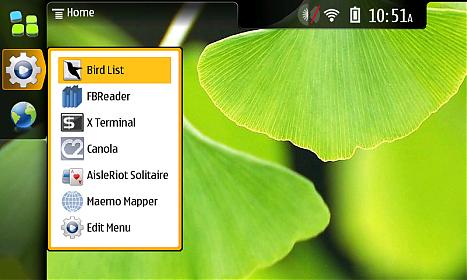
The advantage of the Maemo platform is how open it is. Root access is very easy to enable (just enable the third-party app repository and install openssh, then load up the built-in Terminal). All of the applications are either taken from open-source repositories and compiled for the platform or written in native C or Python, etc. The GUI is based on X-Windows withs support for GTK and QT. The browser is Mozilla-based and has flash built-in (hulu, anyone?).
WebOS is currently utilizing a Linux kernel based on v2.6.24, and it support the Itsy Package Management System (which is very similar to Debian's packaging system). Gaining root requires just enabling developer mode; an app providing that switch is pre-installed and easy to access. Once you telnet to the device (using novaterm), you can add an ipkg repository and install openssh.

The platform supports native applications, but the GUI is homegrown and currently only supports applications written in javascript. The browser is Webkit-based and will support flash later this year.
The following comparisons can be made between the two platforms.
+ Maemo and WebOS use Linux as their kernel base and support glib.
+ Maemo and WebOS use nearly the same packaging system.
+ Both platforms are not locked down and include the tools that allow anyone to install anything on their devices.
- Maemo uses a native development environment and supports any X-enabled GUI application that can be compiled for the platform. WebOS allows for non-GUI applications to be run without killing the homegrown graphical interface, but the graphical interface must be closed in order to run standard X apps.
- Maemo has a built-in GUI terminal app. With WebOS, you have to use a web-enabled terminal.
- Maemo supports desktop widgets. WebOS currently does not.
Despite the differences between the two platforms, the goals that the two platforms try to achieve are parallel to one another. Both Maemo and WebOS provide for easy multitasking and provide applications to support simple communication via the Internet. Nokia and Palm both handle notifications in a similar fashion, but Palm's approach feel more polished.
Even though Nokia could accomplish what Palm has given time, it would be to their advantage to inherit Palm's design approach and immediately have a competitive platform with respect to Google's Android and Apple's iPhone OS. And given that Nokia has been open-sourcing platform they have acquired (Symbian, QT), I feel that they would approach WebOS in a similar manner, which would be a good thing for the mobile computing community. And let's not forget: Nokia makes really good hardware, and they have the resources to support Palm. Given that the Palm Pre has been getting a good reception in Europe, it makes even more sense for Nokia to embrace Palm.
We'll see what transpires...all I know is that Dell buying Palm is not quite so appealing when you consider Nokia as a potential parent.
So, to begin this justification, I first need to go into a little bit of detail on the Maemo and WebOS platforms. Feel free to skip this section if you are already familiar with them.
I have experience with Maemo as a developer and a user. I primarily worked with Maemo 2008 on the Nokia N800 internet tablet. The Maemo kernel is based on Linux v2.6.21, and the filesystem supports the Debian distribution model.
The advantage of the Maemo platform is how open it is. Root access is very easy to enable (just enable the third-party app repository and install openssh, then load up the built-in Terminal). All of the applications are either taken from open-source repositories and compiled for the platform or written in native C or Python, etc. The GUI is based on X-Windows withs support for GTK and QT. The browser is Mozilla-based and has flash built-in (hulu, anyone?).
WebOS is currently utilizing a Linux kernel based on v2.6.24, and it support the Itsy Package Management System (which is very similar to Debian's packaging system). Gaining root requires just enabling developer mode; an app providing that switch is pre-installed and easy to access. Once you telnet to the device (using novaterm), you can add an ipkg repository and install openssh.
The platform supports native applications, but the GUI is homegrown and currently only supports applications written in javascript. The browser is Webkit-based and will support flash later this year.
The following comparisons can be made between the two platforms.
+ Maemo and WebOS use Linux as their kernel base and support glib.
+ Maemo and WebOS use nearly the same packaging system.
+ Both platforms are not locked down and include the tools that allow anyone to install anything on their devices.
- Maemo uses a native development environment and supports any X-enabled GUI application that can be compiled for the platform. WebOS allows for non-GUI applications to be run without killing the homegrown graphical interface, but the graphical interface must be closed in order to run standard X apps.
- Maemo has a built-in GUI terminal app. With WebOS, you have to use a web-enabled terminal.
- Maemo supports desktop widgets. WebOS currently does not.
Despite the differences between the two platforms, the goals that the two platforms try to achieve are parallel to one another. Both Maemo and WebOS provide for easy multitasking and provide applications to support simple communication via the Internet. Nokia and Palm both handle notifications in a similar fashion, but Palm's approach feel more polished.
Even though Nokia could accomplish what Palm has given time, it would be to their advantage to inherit Palm's design approach and immediately have a competitive platform with respect to Google's Android and Apple's iPhone OS. And given that Nokia has been open-sourcing platform they have acquired (Symbian, QT), I feel that they would approach WebOS in a similar manner, which would be a good thing for the mobile computing community. And let's not forget: Nokia makes really good hardware, and they have the resources to support Palm. Given that the Palm Pre has been getting a good reception in Europe, it makes even more sense for Nokia to embrace Palm.
We'll see what transpires...all I know is that Dell buying Palm is not quite so appealing when you consider Nokia as a potential parent.
Monday, October 26, 2009
Palm WebOS Should Support Facebook Open Platform and OpenSocial APIs
This seems so obvious that I held off posting about it until today, but it bothers me. Granted, I've already run out of space for apps on my Palm Pre (hopefully they either expand /var or create a container for apps on the FAT partition, or maybe I'll give in and do it myself), and i'm not a big user of Facebook apps (aside from Go, most of the apps I do have are for syncing information), but given that the current application SDK is based on Javascript and rendering HTML, it only makes sense that Palm would build in support for Facebook and OpenSocial apps. Having API support for these platforms would provide Palm and WebOS users access to numerous and a growing ecosystem of both web-enabled and native applications. Of course one can use these applications via the built-in browser, but having the ability to both install and use any of these applications would be a huge selling point for WebOS. In fact, syncing support within WebOS should provide the capability of syncing one's installed set of Facebook and OpenSocial Apps.
And while they're at it, Palm should also add bookmark syncing and integrate Facebook and LinkedIn profile links within Contacts. Facebook Chat should also be added to Messaging, and Facebook and LinkedIn messages to Email. And, of course, let's not forget about making everything work faster under WebOS...I think i'll have to leave my set of requests at that for now.
And while they're at it, Palm should also add bookmark syncing and integrate Facebook and LinkedIn profile links within Contacts. Facebook Chat should also be added to Messaging, and Facebook and LinkedIn messages to Email. And, of course, let's not forget about making everything work faster under WebOS...I think i'll have to leave my set of requests at that for now.
Saturday, October 17, 2009
The Sense Experience Running on Android
I decided to take a look at a review of the HTC Hero on Engadget to get an idea of what innovations HTC has implemented on top of Android to improve the overall experience of using the device. This review is a bit dated, but given that the Hero is now being offered on Sprint I figured it was somewhat relevant.
I have played around with the Google Dev Phone (i.e. the HTC T-Mobile G1), and I also have experience developing a basic networking / statistics gathering application for Android OS. Similar to the Pre, once you provide your Google login information you are given access to a slew of Google services and applications including Gmail, Gchat, your Google contacts, and Google Voice.
The Android OS application development environment is based on Java which drastically decreases the complexity of designing for this platform, and in addition to providing an open distribution model (applications can be distributed via a website or through the Android Market) which would explain the influx of developers despite the small (albeit growing) number of users on this platform. Overall, I felt that the web documentation, multi-platform integration with Eclipse, and the ease of testing applications on either a real device or the emulator provides for a great developer experience.
While I did enjoy tying Google Voice with Gizmo on the G1 (to provide me with a cell network-less phone) and using native applications such as Gmail and MP3Tunes, I was not incredibly impressed with the method of multitasking on the device (relying on the pull-down menu to access running tasks and notifications) and not being able to keep websites loaded while I am using other applications. The Sense UI, however, in conjunction with the standard widgets currently available on Android, does allow for having simple functions concurrently and quickly accessible via the available 7 "screens". Having the weather, messaging, music player controls, bookmarks, and photo album access always running and available quickly is advantageous, but not having the ability to leave browser pages open prevents me from truly taking advantage of the multitasking goodness of the OS. I could see myself trying to make do with a Google Reader widget, but as soon as I started selecting links and interfacing between that site and Facebook/email/messaging, I feel I may be left a bit disappointed. It sure is nice for Android to have Flash lite, but Engadget demonstrates how slow it really is (hence why Adobe's announcement of Flash 10.1 mobile for WebOS and Android is so important). Anyhow, take a look at the Engadget demo of widgets in conjunction with the Sense Experience below.
I have played around with the Google Dev Phone (i.e. the HTC T-Mobile G1), and I also have experience developing a basic networking / statistics gathering application for Android OS. Similar to the Pre, once you provide your Google login information you are given access to a slew of Google services and applications including Gmail, Gchat, your Google contacts, and Google Voice.
The Android OS application development environment is based on Java which drastically decreases the complexity of designing for this platform, and in addition to providing an open distribution model (applications can be distributed via a website or through the Android Market) which would explain the influx of developers despite the small (albeit growing) number of users on this platform. Overall, I felt that the web documentation, multi-platform integration with Eclipse, and the ease of testing applications on either a real device or the emulator provides for a great developer experience.
While I did enjoy tying Google Voice with Gizmo on the G1 (to provide me with a cell network-less phone) and using native applications such as Gmail and MP3Tunes, I was not incredibly impressed with the method of multitasking on the device (relying on the pull-down menu to access running tasks and notifications) and not being able to keep websites loaded while I am using other applications. The Sense UI, however, in conjunction with the standard widgets currently available on Android, does allow for having simple functions concurrently and quickly accessible via the available 7 "screens". Having the weather, messaging, music player controls, bookmarks, and photo album access always running and available quickly is advantageous, but not having the ability to leave browser pages open prevents me from truly taking advantage of the multitasking goodness of the OS. I could see myself trying to make do with a Google Reader widget, but as soon as I started selecting links and interfacing between that site and Facebook/email/messaging, I feel I may be left a bit disappointed. It sure is nice for Android to have Flash lite, but Engadget demonstrates how slow it really is (hence why Adobe's announcement of Flash 10.1 mobile for WebOS and Android is so important). Anyhow, take a look at the Engadget demo of widgets in conjunction with the Sense Experience below.
Subscribe to:
Comments (Atom)