Thursday, February 24, 2011
Joshua Topolsky Late Night Motorola and HPalm Demo
Check out the Motorola Atrix with netbook dock, Motorola Xoom, and very well executed Palm Veer, Pre^3, and TouchPad / Touch to Share demos below.
Saturday, February 12, 2011
Palm WebOS 3.0 vs. Google Android 3.0 (HoneyComb) and User Interfaces [Updated]
Now that WebOS 3.0 for the Palm TouchPad has been announced and a more extensive demo of Android 3.0 was shown, it is time to evaluate these tablet UIs and the advantages and disadvantages to each approach.
Before we begin, let's review the classic UI approaches of Microsoft in Windows and Apple in Mac OS (X and iOS). The original Apple Mac UI (circa 1984) only supported running one application at a time (sound familiar?), with a centralized application menu bar at the top of the screen. The Apple menu bar (still in use today) changes based on what application is currently in focus. A single application can have multiple windows in Mac OS, but there is only a title bar attached to a window. By contrast, Microsoft attaches a menu bar along with the title bar to each window, which typically represents a single application. Closing a window will terminate the application on Windows if there are no remaining windows tied to that application; closing a window on Mac OS does not terminate the application, however. Prior to the Windows taskbar and the Mac dock, a task manager or top menu drop-down was used to manage any backgrounded applications, respectively. The modern Windows 7 taskbar and Mac OS X dock both provide an indication of running applications and quick access to launching docked or pinned applications, but the menu bar remains mostly unchanged, albeit hidden at times based on user preference or full-screen mode.
The proliferation of multitouch displays has reinvigorated the UI debate. Aside from making Windows 7 more touch-friendly, Microsoft has taken a different approach with Windows Phone 7, in which applications are incorporated in panels (similar to Zune or Xbox) where only one application is in focus at a time. Microsoft, Apple, Google, Palm, and RIM follow the same trend on mobile touchscreen displays as the original Palm OS, but the degree to which applications are allowed to run in the background widely varies based on what mode the application is perceived to be in. Microsoft's Windows Phone 7 has limited multitasking to OS services similar to the approach Apple had taken in iOS until 4.x. Apple introduced limited third-party multitasking based on certain events like audio playback, but the OS can still suspend an application if more memory is needed for another application and suspends the main process of a task when it is no longer in focus. Using Spaces on Mac OS provides an environment for each running application, much like what iOS is likely to do in the next iteration of their UI when there will be a gesture to switch between backgrounded applications. Google's Android treats applications more like Microsoft's PocketPC OS of the past, allowing applications to remain running in the background but opting to suspend applications if other applications are requesting for memory.
RIM continues down the path of real-time operating systems, moving from Blackberry OS to QNX; while the UI changed drastically during the transition from one core to the other, the approach of running applications seemed to remain relatively the same. Blackberry OS provides something like a mini-taskbar and sets third-party at a lower priority than Blackberry core applications, such as phone, email and messaging, but every running application is given a guaranteed time-slice. On the Blackberry Playbook, visible applications can remain running when out-of-focus or they can be paused to conserve battery.
Palm's approach for running applications continues to be based on the PDA and smartphone revolutions that the company led with the Palm Pilot and the Handspring Treo, respectively. Therefore, the primary PIM functions are what continue to drive the interaction between applications and the core services of WebOS. The Palm SDK provides access to the central database that contains contact information and messages, and the Internet is essentially a series of databases with useful information to applications, hence why the move to web APIs made the most sense. The PDK still provides hardware access needed for audio and graphics intensive applications. The card interface provides a way not only of organizing running applications, but also a way to stack information in a way that makes it easier to organize your life on-the-go. It also makes it easier to consume information and media on a larger screen, and is poised to contend with the dominant desktop UIs of Mac and Windows. (If the web wasn't so important to WebOS, Cards would be a funny name jibe at Windows for desktops and laptops.)
Android is taking many of the UI enhancements added by Palm in WebOS (courtesy of former Palm Senior Director of Human Interface and User Experience Matias Duarte, now Google User Experience Director), but embodies a mix between Windows and Mac OS without providing a way to view multiple applications simultaneously. While WebOS has yet to introduce the ability to dock and use multiple applications simultaneously, it is much closer to providing this ability than Google is with Android 3.0. The way Android 3.0 displays multiple notifications and provides the ability to dismiss or control them is taken from WebOS 1.0, the placement of notifications and the taskbar with shortcuts or menu for running applications is very similar to the Windows 7 taskbar, and the desktop takes widgets from Windows/Android and multiple screens from KDE/Ubuntu and ties them directly to applications. In a way, Android is the closest to providing a view into multiple applications through the use of widgets, but it is quite limited and not as usable as having the application in fullscreen. Google services do add a lot to the mix though; the tablet Gmail application takes some design cues from Palm's Enyo SDK and Windows (Android fragments vs. modular regions, menu bar), the animation framework and renderscript is similar to Apple's iOS and Palm WebOS, and the notification system from WebOS. Check out the Android 3.0 demo below if you haven't seen it already.
[Updated 2/12/2011 8:48PM]
Palm WebOS brings multitasking on mobile touchscreens to the next level. PDK applications that are fullscreen have full access to hardware acceleration; when multiple card mode is initiated, PDK applications are paused but can be resumed nearly instantly once they are in fullscreen again. SDK applications are essentially browser tabs that can be running simultaneously in the background. When an SDK application has a card open, it is sharing resources with any other open cards. When an SDK application is closed, it can register to check for web updates along with other applications at a set interval, which allows it to pop-up in the notification area. It can also reside solely in the notification area to provide regular updates (such as weather or tasks to be completed). The advantage of treating the card interface as a task manager is to make it well known to the user what may currently be contending for resources, while providing an option for an application to check for updates when it has been swiped away in a controlled fashion, similar to push notifications but locally. Push notifications for these events would be nice though; that is one mark that both Google and Apple have on HP.
The niceties of WebOS 3.0 include the sharing of text messages and ability to forward phone calls from a WebOS phone to WebOS tablet, bumping an open webpage from the phone to tablet (or vice-versa), card stacking, and with the Enyo SDK improved access to shared databases and a concentric UI for multiple size screens. It was sad not to see any sort of bluetooth stylus option or the ability to use multiple cards simultaneously in a split-view fashion (as outlined in my tablet predictions), and the gesture area will certainly be missed. If you haven't seen the Think Beyond event yet, check it out below...at least the video demo in HP's event was no Lady-Killer.
Before we begin, let's review the classic UI approaches of Microsoft in Windows and Apple in Mac OS (X and iOS). The original Apple Mac UI (circa 1984) only supported running one application at a time (sound familiar?), with a centralized application menu bar at the top of the screen. The Apple menu bar (still in use today) changes based on what application is currently in focus. A single application can have multiple windows in Mac OS, but there is only a title bar attached to a window. By contrast, Microsoft attaches a menu bar along with the title bar to each window, which typically represents a single application. Closing a window will terminate the application on Windows if there are no remaining windows tied to that application; closing a window on Mac OS does not terminate the application, however. Prior to the Windows taskbar and the Mac dock, a task manager or top menu drop-down was used to manage any backgrounded applications, respectively. The modern Windows 7 taskbar and Mac OS X dock both provide an indication of running applications and quick access to launching docked or pinned applications, but the menu bar remains mostly unchanged, albeit hidden at times based on user preference or full-screen mode.
The proliferation of multitouch displays has reinvigorated the UI debate. Aside from making Windows 7 more touch-friendly, Microsoft has taken a different approach with Windows Phone 7, in which applications are incorporated in panels (similar to Zune or Xbox) where only one application is in focus at a time. Microsoft, Apple, Google, Palm, and RIM follow the same trend on mobile touchscreen displays as the original Palm OS, but the degree to which applications are allowed to run in the background widely varies based on what mode the application is perceived to be in. Microsoft's Windows Phone 7 has limited multitasking to OS services similar to the approach Apple had taken in iOS until 4.x. Apple introduced limited third-party multitasking based on certain events like audio playback, but the OS can still suspend an application if more memory is needed for another application and suspends the main process of a task when it is no longer in focus. Using Spaces on Mac OS provides an environment for each running application, much like what iOS is likely to do in the next iteration of their UI when there will be a gesture to switch between backgrounded applications. Google's Android treats applications more like Microsoft's PocketPC OS of the past, allowing applications to remain running in the background but opting to suspend applications if other applications are requesting for memory.
RIM continues down the path of real-time operating systems, moving from Blackberry OS to QNX; while the UI changed drastically during the transition from one core to the other, the approach of running applications seemed to remain relatively the same. Blackberry OS provides something like a mini-taskbar and sets third-party at a lower priority than Blackberry core applications, such as phone, email and messaging, but every running application is given a guaranteed time-slice. On the Blackberry Playbook, visible applications can remain running when out-of-focus or they can be paused to conserve battery.
Palm's approach for running applications continues to be based on the PDA and smartphone revolutions that the company led with the Palm Pilot and the Handspring Treo, respectively. Therefore, the primary PIM functions are what continue to drive the interaction between applications and the core services of WebOS. The Palm SDK provides access to the central database that contains contact information and messages, and the Internet is essentially a series of databases with useful information to applications, hence why the move to web APIs made the most sense. The PDK still provides hardware access needed for audio and graphics intensive applications. The card interface provides a way not only of organizing running applications, but also a way to stack information in a way that makes it easier to organize your life on-the-go. It also makes it easier to consume information and media on a larger screen, and is poised to contend with the dominant desktop UIs of Mac and Windows. (If the web wasn't so important to WebOS, Cards would be a funny name jibe at Windows for desktops and laptops.)
Android is taking many of the UI enhancements added by Palm in WebOS (courtesy of former Palm Senior Director of Human Interface and User Experience Matias Duarte, now Google User Experience Director), but embodies a mix between Windows and Mac OS without providing a way to view multiple applications simultaneously. While WebOS has yet to introduce the ability to dock and use multiple applications simultaneously, it is much closer to providing this ability than Google is with Android 3.0. The way Android 3.0 displays multiple notifications and provides the ability to dismiss or control them is taken from WebOS 1.0, the placement of notifications and the taskbar with shortcuts or menu for running applications is very similar to the Windows 7 taskbar, and the desktop takes widgets from Windows/Android and multiple screens from KDE/Ubuntu and ties them directly to applications. In a way, Android is the closest to providing a view into multiple applications through the use of widgets, but it is quite limited and not as usable as having the application in fullscreen. Google services do add a lot to the mix though; the tablet Gmail application takes some design cues from Palm's Enyo SDK and Windows (Android fragments vs. modular regions, menu bar), the animation framework and renderscript is similar to Apple's iOS and Palm WebOS, and the notification system from WebOS. Check out the Android 3.0 demo below if you haven't seen it already.
[Updated 2/12/2011 8:48PM]
Palm WebOS brings multitasking on mobile touchscreens to the next level. PDK applications that are fullscreen have full access to hardware acceleration; when multiple card mode is initiated, PDK applications are paused but can be resumed nearly instantly once they are in fullscreen again. SDK applications are essentially browser tabs that can be running simultaneously in the background. When an SDK application has a card open, it is sharing resources with any other open cards. When an SDK application is closed, it can register to check for web updates along with other applications at a set interval, which allows it to pop-up in the notification area. It can also reside solely in the notification area to provide regular updates (such as weather or tasks to be completed). The advantage of treating the card interface as a task manager is to make it well known to the user what may currently be contending for resources, while providing an option for an application to check for updates when it has been swiped away in a controlled fashion, similar to push notifications but locally. Push notifications for these events would be nice though; that is one mark that both Google and Apple have on HP.
The niceties of WebOS 3.0 include the sharing of text messages and ability to forward phone calls from a WebOS phone to WebOS tablet, bumping an open webpage from the phone to tablet (or vice-versa), card stacking, and with the Enyo SDK improved access to shared databases and a concentric UI for multiple size screens. It was sad not to see any sort of bluetooth stylus option or the ability to use multiple cards simultaneously in a split-view fashion (as outlined in my tablet predictions), and the gesture area will certainly be missed. If you haven't seen the Think Beyond event yet, check it out below...at least the video demo in HP's event was no Lady-Killer.
Monday, February 07, 2011
Motorola Atrix
This Android phone has sparked my interest due to one notable feature: webtop mode. This would be a great feature to use as a developer and a multitasker, and although it does not function nearly as well on the latter as WebOS might on a tablet or netbook, it provides a great environment for exploring and using Android apps and browsing the web when you require something more than a single-screen Android device can provide. Anyhow, check out the entire video from Engadget to see Joshua Topolsky switch between a PC dock, a netbook dock, and a TV dock. Spoiler: the screen becomes a virtual mouse for the TV when in webtop mode.
Tuesday, January 18, 2011

Saturday, January 08, 2011
Upcoming Palm Tablet Predictions
Anticipation for the WebOS tablet almost overshadows Computing Titans of Today (Part 2) [no worries, that blog posting will arrive soon ;-) ]. However, with CES 2011 coming to an end and HP Palm finally scheduling a WebOS event February 9, the moment is ripe for Palm tablet predictions. To preface, let's start with a quick overview of WebOS 2.0.
WebOS 2.0 brings enhancements to universal search, card (i.e visible running applications) organization, customizable text auto-completion, different touchstone screen states, and many minor feature additions such as Bluetooth keyboard and VPN support. Just Type (formerly known as universal search) adds support for searching application indexes (such as email), Google suggestions, and more search engines with the option to add any website that WebOS detects as search-compatible. Just Type also provides quick access to updating a Facebook status, posting to Twitter, and creating a new note, memo, or email.


Text Assist wraps support for auto-capitalization, auto-correction, and user customizable shortcuts (similar to Palm OS). Exhibition provides for customization of the Palm screen while the device is on the Touchstone.

Arguably the most touch tablet friendly feature is the card interface, and the addition of stacks provide an organization method that is not only useful on small screen but large screens as well. On a device with a 3.1" screen like the Palm Pre or even a 2.63" screen like the Palm Pixi, using stacks makes having 10+ cards open simultaneously a lot more manageable. When one card opens up a web page or email card, for example, the cards are automatically stacked, and moving a card into or out of a stack functions the same way as re-arranging cards in WebOS 1.x. The following video is a good demonstration of how stacking cards looks and works.
On a WebOS tablet, I anticipate that stacks will actually appear expanded when in view so that multiple cards can be used simultaneously. The Notion Ink Adam can display three Android applications on their 10.1" 1024x600 screen and also support applications with split views or full screen apps, but scrolling between applications can be cumbersome without a method to group applications into mini-workspaces.

One of the more exciting things in development at HP Palm is the follow-up to the Palm Ares SDK, the Palm Enyo SDK. HP Palm is working not only to improve performance of the Webkit engine to work on memory starved devices such as the original Palm Pre and the Palm Pixi but also provide a basis for applications that can easily expand to being used on larger screens. Palm demonstrated a mail application that, running on a mobile showed only one screen at a time, but when running on a larger screen showed three panes simultaneously. This also parallels windowed vs. full screen applications on a desktop; on a tablet, an application like mail could either be placed on one pane or expand to three panes based on user preference. The following is a technology demonstration of Palm Enyo.
The Bluetooth keyboard support will be useful when coupled with a touchstone accessory that could be used with a WebOS 2.0 device with a larger screen, such as a PalmPad or a phone with an HDMI out to an external screen. A Wacom-like stylus would also be slick and is a possibility thanks to HP.
One feature that I would love to see on WebOS tablet (and phone) is a screen of widgets similar to the Dashboard feature on Mac OS X. I prefer not to clutter the desktop like Android tends to, but having a screen that can be summoned in or out via gesture would be useful. At the moment the notifications section already provide me with the current temperature and is a good location for small snippets of information, and Exhibition will be good for providing access to news headlines and more weather information, so Palm WebOS is not totally lacking on that front.
So to wrap-up, expectations are very high for the WebOS tablet, but the UI enhancements brought to WebOS 2.0 can be expanded to bring an excellent tablet experience that should knock Notion Ink's Adam, RIM's Playbook, and Google's Android Honeycomb out of the water. In the meantime, enjoy video demos from Notion Ink, RIM, and Google and be sure to check out Palm's former UI designer (now working on Honeycomb) Matias Duarte interview on Engadget.
WebOS 2.0 brings enhancements to universal search, card (i.e visible running applications) organization, customizable text auto-completion, different touchstone screen states, and many minor feature additions such as Bluetooth keyboard and VPN support. Just Type (formerly known as universal search) adds support for searching application indexes (such as email), Google suggestions, and more search engines with the option to add any website that WebOS detects as search-compatible. Just Type also provides quick access to updating a Facebook status, posting to Twitter, and creating a new note, memo, or email.
Text Assist wraps support for auto-capitalization, auto-correction, and user customizable shortcuts (similar to Palm OS). Exhibition provides for customization of the Palm screen while the device is on the Touchstone.
Arguably the most touch tablet friendly feature is the card interface, and the addition of stacks provide an organization method that is not only useful on small screen but large screens as well. On a device with a 3.1" screen like the Palm Pre or even a 2.63" screen like the Palm Pixi, using stacks makes having 10+ cards open simultaneously a lot more manageable. When one card opens up a web page or email card, for example, the cards are automatically stacked, and moving a card into or out of a stack functions the same way as re-arranging cards in WebOS 1.x. The following video is a good demonstration of how stacking cards looks and works.
On a WebOS tablet, I anticipate that stacks will actually appear expanded when in view so that multiple cards can be used simultaneously. The Notion Ink Adam can display three Android applications on their 10.1" 1024x600 screen and also support applications with split views or full screen apps, but scrolling between applications can be cumbersome without a method to group applications into mini-workspaces.
One of the more exciting things in development at HP Palm is the follow-up to the Palm Ares SDK, the Palm Enyo SDK. HP Palm is working not only to improve performance of the Webkit engine to work on memory starved devices such as the original Palm Pre and the Palm Pixi but also provide a basis for applications that can easily expand to being used on larger screens. Palm demonstrated a mail application that, running on a mobile showed only one screen at a time, but when running on a larger screen showed three panes simultaneously. This also parallels windowed vs. full screen applications on a desktop; on a tablet, an application like mail could either be placed on one pane or expand to three panes based on user preference. The following is a technology demonstration of Palm Enyo.
The Bluetooth keyboard support will be useful when coupled with a touchstone accessory that could be used with a WebOS 2.0 device with a larger screen, such as a PalmPad or a phone with an HDMI out to an external screen. A Wacom-like stylus would also be slick and is a possibility thanks to HP.
One feature that I would love to see on WebOS tablet (and phone) is a screen of widgets similar to the Dashboard feature on Mac OS X. I prefer not to clutter the desktop like Android tends to, but having a screen that can be summoned in or out via gesture would be useful. At the moment the notifications section already provide me with the current temperature and is a good location for small snippets of information, and Exhibition will be good for providing access to news headlines and more weather information, so Palm WebOS is not totally lacking on that front.
So to wrap-up, expectations are very high for the WebOS tablet, but the UI enhancements brought to WebOS 2.0 can be expanded to bring an excellent tablet experience that should knock Notion Ink's Adam, RIM's Playbook, and Google's Android Honeycomb out of the water. In the meantime, enjoy video demos from Notion Ink, RIM, and Google and be sure to check out Palm's former UI designer (now working on Honeycomb) Matias Duarte interview on Engadget.
Thursday, October 07, 2010
Computing Titans of Today (Part 1)
 There are many computer technology companies that can be considered innovators and market drivers both in the past and even into the present, but there are only a notable few who really stand out and simultaneously frighten and inspire both their counterparts and their customers. It is interesting to note that these companies overlap so much that for all intensive purposes they are competitors, yet they all find themselves developing for one-another's platform to remain relevant to all of their customers.
If you are a 2010 computer user, you likely know which four companies I am about to talk about. But first I would like to break these companies into their respective financial markets to try and account for the driving forces of these companies.
Hardware - The original primary driver of the computing industry. When there is a need to create and compute, the first thing required is good hardware. What began as a calculator evolved into a general purpose computer, handling any task from accounting to communications, graphic design to writing, and launching a rocket to feeding a person's lungs and heart. Regardless of whether a company wants to sell a mainframe, a desktop, or an embedded device, software is required to unleash the true potential of the device. The greater the profit margin desired, the more value that must be extracted from the hardware in the form of higher quality parts and design, better firmware and software design and implementation, and mechanical and industrial design. But ultimately the goal is to sell more hardware.
Software - The next big driver of the computing industry. When the hardware was readily available but the hardware companies could not keep up with the demand for more applications, the software development had to be incentivized independent from hardware sales. This was and continues to be a difficult item to sell as there is no physical object being sold; instead, a license is sold with no guarantee on usability for a large period of time. The value of software is dependent upon what currently exists that can also accomplish a similar task compared to what time efficiency, usability, and flashiness its derivative or replacement can provide. And finally, the value of the product and/or continued development and features depend on how much work is required to develop that software, all of which is driven by the hardware and the engineers or developers. On the other hand, the profit margin can be higher than hardware by increasing sales and with exposure to parallel functions and applications. So the goal is to sell more of the same software without requiring too much free support and updates (or to give out software but charge lots for support and updates).
Direct Sales - The dotcom boom led to another big driver of the computing industry. In order to increase profit, a store needs to sell large quantities of stuff with low overhead. Selling certain types of physical goods can garner a decent margin, but increasing variety encourages larger orders and repeat customers, and selling virtual goods, especially when these virtual goods are homegrown, provide the greatest revenue potential. Focus is on ease of purchase in all manners possible, anywhere the customer happens to be.
Advertising - The main driver of radio and television is also the latest big driver of the computing industry. More eyeballs equate to greater revenue, and the more technology a company owns that attracts attention, the larger the profit margin. Rapid adaptation is required to retain and increase mindshare, which certainly makes it the most difficult avenue to pursue, but with the potential for greater exposure and reward.
The positive aspect of having four driving forces in the computing industry is that the technology must adapt rapidly, which in turn leads to convergence as, in the end, all computers have similar hardware and software but different system implementations that produce similar results.
The negative aspect is that small technology innovators will struggle to survive in this landscape unless they manage to find a niche slightly outside these four domains, are acquired by a company with strengths in one of these four domains, or steal enough mindshare away from a weakened technology player to gain enough wealth to compete with a dominant player in of these four domains.
This leads me to formally introduce the four dominant leaders of the technology industry in 2010. Once again, this is likely to change in future years, but all these companies have either acquired enough wealth, mindshare, or both to continue to innovate, dominate, and compete effectively. If it wasn't for the existence of these four driving forces, there would be a technology monopoly (think Microsoft in the '90s). Despite the antitrust rulings against Microsoft being fairly weak and too late, the resurgance of Apple and the arrival of Amazon.com and Google have led to enough competition to provide some sort of balance to the consumer computing industry.
To be continued...
Monday, April 12, 2010
Palm Revenue Possibilities
A lot has changed since I last posted about a possible Palm and Nokia Union. Nokia has partnered with Intel and merged Moblin with Maemo to create Meego. Palm launched the Pre Plus and Pixi Plus on Verizon but flopped with the launch, thus resulting in an awesome deal for Verizon subscribers (free Mobile Hot Spot!). Apple released the iPad and iPhone OS 4.0, addressing multitasking in a not-so-elegant way and completely overlooking notification reform. Finally, HTC announced the Evo on Sprint, surpassing Palm in the launch of the first 4G phone on their preferred network.
Even though Palm should still have ~$400 million in the bank (which really should be able to keep Palm alive longer than a year if they are focusing on R&D engineering and considering they finally dropped their failure of an advertising partner), there are strong rumors that HTC, Cisco, and Lenevo are in the second round of bidding for Palm, so it's about time I throw in my $0.02 and take another stab at it. Enjoy!
Cisco - Strong Internet-centric company with more than $30 billion in the bank. Powerful media-rich product line including the Flip Mini HD, Telepresence (see the two videos below for a sample), Digital Whiteboard, and of course Linksys. They were also one of the first companies to support Wimax/4G, but despite being the backbone of the Internet and being a fairly open company (WRT54G and specification-wise), they are lacking in one key area and that is smartphones. With Apple, Google, Microsoft, and Nokia growing in significance with mobile platforms and the Internet, Cisco may desire to branch out even further in consumer devices and adopt Palm WebOS as their mobile platform and help bring a better multimedia and connected experience. I would certainly stick with WebOS and Palm devices if Cisco purchased and invested in Palm.
HTC - Produces popular smartphones that currently run Windows Mobile and Android. Hardware revisions seem to hit the market very rapidly in recent months (Touch Pro 2, HD2, Nexus One, Evo). Palm WebOS would benefit from solid hardware with frequent revisions and modern features that compete with Nokia. Palm's patent portfolio in the PDA and smartphone market could help HTC ward off Apple in their present quarrel.
Lenevo - Owner of IBM's laptop and desktop division and demonstrated a cool laptop with a detachable screen tablet called the IdeaPad U1 (see below for video). They are currently using a Linux-based operating system for the detached screen. Lenevo also introduced an Android-based smartphone at CES, but in a quickly fragmented Android marketplace WebOS could prove to be a unique differentiator for Palm. WebOS would also be a great OS for a tablet / iPad competitor (maybe the IdeaPad U2?). The OS could also be licensed to Lenevo as a tablet OS; either way, I would probably buy one.
Don't forget to take a look at Engadget's take on this. Long live Palm and WebOS!
Even though Palm should still have ~$400 million in the bank (which really should be able to keep Palm alive longer than a year if they are focusing on R&D engineering and considering they finally dropped their failure of an advertising partner), there are strong rumors that HTC, Cisco, and Lenevo are in the second round of bidding for Palm, so it's about time I throw in my $0.02 and take another stab at it. Enjoy!
Cisco - Strong Internet-centric company with more than $30 billion in the bank. Powerful media-rich product line including the Flip Mini HD, Telepresence (see the two videos below for a sample), Digital Whiteboard, and of course Linksys. They were also one of the first companies to support Wimax/4G, but despite being the backbone of the Internet and being a fairly open company (WRT54G and specification-wise), they are lacking in one key area and that is smartphones. With Apple, Google, Microsoft, and Nokia growing in significance with mobile platforms and the Internet, Cisco may desire to branch out even further in consumer devices and adopt Palm WebOS as their mobile platform and help bring a better multimedia and connected experience. I would certainly stick with WebOS and Palm devices if Cisco purchased and invested in Palm.
HTC - Produces popular smartphones that currently run Windows Mobile and Android. Hardware revisions seem to hit the market very rapidly in recent months (Touch Pro 2, HD2, Nexus One, Evo). Palm WebOS would benefit from solid hardware with frequent revisions and modern features that compete with Nokia. Palm's patent portfolio in the PDA and smartphone market could help HTC ward off Apple in their present quarrel.
Lenevo - Owner of IBM's laptop and desktop division and demonstrated a cool laptop with a detachable screen tablet called the IdeaPad U1 (see below for video). They are currently using a Linux-based operating system for the detached screen. Lenevo also introduced an Android-based smartphone at CES, but in a quickly fragmented Android marketplace WebOS could prove to be a unique differentiator for Palm. WebOS would also be a great OS for a tablet / iPad competitor (maybe the IdeaPad U2?). The OS could also be licensed to Lenevo as a tablet OS; either way, I would probably buy one.
Don't forget to take a look at Engadget's take on this. Long live Palm and WebOS!
Wednesday, February 17, 2010
U.S. Smartphone Adoption is Being Held Back by Wireless Carriers...YEAH I SAID IT!
It is amazing how much smartphones have grown in popularity in the last few years. The mobile market took much longer to mature than the general computing market. It took a licensable advanced and continually evolving computer architecture (ARM), shrinking process technology, dense memory capacities (both in solid-state and RAM), and optimization of open-source operating systems (Darwin and Linux) and software (Webkit) for mobile platforms to bring about an enjoyable media and internet-rich experience to mobile phones. The PC market was able to thrive with a proprietary computer architecture (x86), closed-source operating system (Windows), and inefficient software, but Moore's law and form factor made up for the loss of performance and capability caused by this approach.
Thanks to the steps (whether intentional or not) made in the computing market to share technological innovations and reduce cost, size, and power consumption, all while increasing performance and storage capacity, products such as the Apple iPhone, Windows Mobile 6.x, Palm WebOS, and the Blackberry have made it possible to not only schedule but also accomplish tasks and consume live on-demand content while in transit. Apple introduced the MessagePad, a 7" x 4" device running Newton that provided one of the first stylus-based implementations with PIM and sync technology. Palm brought about PIM and sync functionality and mobile applications with the Palm Pilot 1000, a 4.72" x 3" device running a 16MHz 68000 processor with only 128KB of RAM. The Nokia 9000 was one of the first mobile phones with web and PIM capabilities. By the time Windows CE evolved into PocketPC devices, ARM (pushed via Intel's XScale) clocked at 133MHz+ made it possible for software to play music (without needing an expansion Handspring module) and video. Once Direct3D support arrived on the Microsoft platform and 400MHz processors became commonplace, mobile gaming on general purpose devices took off. Returning to smartphones, the Symbian OS (now open-source) combined with an Ericsson R380 touch-screen phone brought about the first modern PDA phone, followed by the Handspring (now Palm) Treo. The RIM Blackberry smartphone was the first mobile email solution that was fast and robust, thanks to the enterprise server software developed by RIM.
Up until email and web services were made available on smartphones, the barrier of entry was cost of the device; aside from exclusivity and handset tied to a specific carrier, one could still opt for a standard voice plan and still take advantage of using Hot-or-Active sync'd and preinstalled applications. Admittedly, having 2 different wireless standards (CDMA vs. GSM) and locking people into multi-year contracts with a phone that was locked to that specific carrier did not help the industry as a whole, but the low cost of entry was beneficial to the explosion of mobile phone usage in the U.S.
Then came the Blackberry email plan, adding $15 a month to a voice plan. The wireless web plans were not compatible with all phones (in my case, the Kyocera 7135 on U.S. Cellular), and they were costly ($15 a month for each desired "service" or $1.50+ per access, $0.50/MB). Add on top of that text messaging fees (up to $20 a month for unlimited, $5 for 250 messages, $0.25 per message) and you're easily paying up to $70 a month per person for wireless service! No wonder text messages had such a delayed start in the states compared to Europe and Asia. And with slow adoption of text messages, there was a limited driving force to use MMS; U.S. phones are just starting to come standard with 2-5 megapixel cameras, but Nokia and Samsung were selling 5 megapixel feature phones over 2 years ago!
Then Apple came along with the iPhone. By incorporating innovations Apple and other mobile device companies have been developing for over 15 years, they released a device that could handle the multimedia, PDA, and mobile web needs of the populace. Adapting Safari and using a capacitive touch screen was certainly innovative, but arguably Apple's negotiation with a wireless carrier was the move to help spur mass adoption. Apple's iPod really took off once they released a Windows version and added a music store to iTunes, working with the labels on a solution they were comfortable with. Unfortunately, in the case of mobile data, the trend went in the opposite direction. Shortly after music within the iTunes store lost its DRM and maintained a relatively low cost that Apple dictated, the iPhone monthly plan went from unlimited data (using Edge) and 200 text messages for $60 a month (~$15-20 a month premium) to just unlimited data (using 3G or Edge) for $70 a month ($30 a month premium). For the equivalent plan to the original iPhone, an average iPhone user would be paying $75 + tax and fees. In other words, as much as Apple tried to redefine mobile usage and spur mass adoption, AT&T changes the terms once again and we're back to square one.
These days, buying a smartphone through a carrier typically involves signing a 2 year contract for a plan costing $70 a month or more. The Blackberry is still selling a large number phones due to being free or nearly free with contract, but I suspect that the majority of cell phone users are still hesitant to adopt a smartphone due to monthly plan costs. When the decision lies between choosing a feature phone with the option of basic web capabilities for $10 extra and a smartphone that requires the customer to pay $30 extra per month, most people will choose the feature phone unless they can really justify the expense. Let's not forget that modern smartphones have wifi, thus nullifying the need for the extra expense, yet it is forced upon the customer at purchase.
Interesting enough, PC can be built or purchased for under the cost of a smartphone at retail, yet the modern smartphone is more personal than a personal computer. Yes, people may argue that they do not need a smartphone, but at one point one may have made the same argument about the personal computer. As smartphones are becoming more advanced and PCs cheaper, it would be natural for them to appeal to a larger audience. But I know people personally who will not buy a smartphone because of how much it adds to the cost of a plan. Sprint is heading in the right direction with their Simply Everything plan (which includes unlimited data and texting), but Sprint (just like every other U.S. carrier except for T-Mobile) requires you to pay $70 a month for a plan. T-Mobile is also heading in the right direction by encouraging people to purchase a smartphone (like the Nexus One via Google) out-right and then opt to pay for the plan desired. As much as the U.S. audience loves free phones, I think that ultimately people will have to accept the full cost of the phone so that we can finally start to have a real mobile computer revolution, free from carrier intervention.
Finally though, I think that we are moments away from being able to purchase data-only as the base plan for all the services we desire. We shouldn't be required to pay for voice minutes or text messages; instead, we'll pay for data through a utility company and subscribe to voice and data services through independent providers. Yes, this means wireless data will be metered, but this way you will pay for exactly what you use. By reducing the base plan cost of a mobile device to a modest fee, people will be more willing to pay for smartphones and the data access that powers them, and we'll be able to change the way we look at mobile forever.
See also:
Smartphone Device & Chip Market Opportunities 2010
Editorial: Voice rate cuts, data rate hikes, and the case for metered billing
Thanks to the steps (whether intentional or not) made in the computing market to share technological innovations and reduce cost, size, and power consumption, all while increasing performance and storage capacity, products such as the Apple iPhone, Windows Mobile 6.x, Palm WebOS, and the Blackberry have made it possible to not only schedule but also accomplish tasks and consume live on-demand content while in transit. Apple introduced the MessagePad, a 7" x 4" device running Newton that provided one of the first stylus-based implementations with PIM and sync technology. Palm brought about PIM and sync functionality and mobile applications with the Palm Pilot 1000, a 4.72" x 3" device running a 16MHz 68000 processor with only 128KB of RAM. The Nokia 9000 was one of the first mobile phones with web and PIM capabilities. By the time Windows CE evolved into PocketPC devices, ARM (pushed via Intel's XScale) clocked at 133MHz+ made it possible for software to play music (without needing an expansion Handspring module) and video. Once Direct3D support arrived on the Microsoft platform and 400MHz processors became commonplace, mobile gaming on general purpose devices took off. Returning to smartphones, the Symbian OS (now open-source) combined with an Ericsson R380 touch-screen phone brought about the first modern PDA phone, followed by the Handspring (now Palm) Treo. The RIM Blackberry smartphone was the first mobile email solution that was fast and robust, thanks to the enterprise server software developed by RIM.
Up until email and web services were made available on smartphones, the barrier of entry was cost of the device; aside from exclusivity and handset tied to a specific carrier, one could still opt for a standard voice plan and still take advantage of using Hot-or-Active sync'd and preinstalled applications. Admittedly, having 2 different wireless standards (CDMA vs. GSM) and locking people into multi-year contracts with a phone that was locked to that specific carrier did not help the industry as a whole, but the low cost of entry was beneficial to the explosion of mobile phone usage in the U.S.
Then came the Blackberry email plan, adding $15 a month to a voice plan. The wireless web plans were not compatible with all phones (in my case, the Kyocera 7135 on U.S. Cellular), and they were costly ($15 a month for each desired "service" or $1.50+ per access, $0.50/MB). Add on top of that text messaging fees (up to $20 a month for unlimited, $5 for 250 messages, $0.25 per message) and you're easily paying up to $70 a month per person for wireless service! No wonder text messages had such a delayed start in the states compared to Europe and Asia. And with slow adoption of text messages, there was a limited driving force to use MMS; U.S. phones are just starting to come standard with 2-5 megapixel cameras, but Nokia and Samsung were selling 5 megapixel feature phones over 2 years ago!
Then Apple came along with the iPhone. By incorporating innovations Apple and other mobile device companies have been developing for over 15 years, they released a device that could handle the multimedia, PDA, and mobile web needs of the populace. Adapting Safari and using a capacitive touch screen was certainly innovative, but arguably Apple's negotiation with a wireless carrier was the move to help spur mass adoption. Apple's iPod really took off once they released a Windows version and added a music store to iTunes, working with the labels on a solution they were comfortable with. Unfortunately, in the case of mobile data, the trend went in the opposite direction. Shortly after music within the iTunes store lost its DRM and maintained a relatively low cost that Apple dictated, the iPhone monthly plan went from unlimited data (using Edge) and 200 text messages for $60 a month (~$15-20 a month premium) to just unlimited data (using 3G or Edge) for $70 a month ($30 a month premium). For the equivalent plan to the original iPhone, an average iPhone user would be paying $75 + tax and fees. In other words, as much as Apple tried to redefine mobile usage and spur mass adoption, AT&T changes the terms once again and we're back to square one.
These days, buying a smartphone through a carrier typically involves signing a 2 year contract for a plan costing $70 a month or more. The Blackberry is still selling a large number phones due to being free or nearly free with contract, but I suspect that the majority of cell phone users are still hesitant to adopt a smartphone due to monthly plan costs. When the decision lies between choosing a feature phone with the option of basic web capabilities for $10 extra and a smartphone that requires the customer to pay $30 extra per month, most people will choose the feature phone unless they can really justify the expense. Let's not forget that modern smartphones have wifi, thus nullifying the need for the extra expense, yet it is forced upon the customer at purchase.
Interesting enough, PC can be built or purchased for under the cost of a smartphone at retail, yet the modern smartphone is more personal than a personal computer. Yes, people may argue that they do not need a smartphone, but at one point one may have made the same argument about the personal computer. As smartphones are becoming more advanced and PCs cheaper, it would be natural for them to appeal to a larger audience. But I know people personally who will not buy a smartphone because of how much it adds to the cost of a plan. Sprint is heading in the right direction with their Simply Everything plan (which includes unlimited data and texting), but Sprint (just like every other U.S. carrier except for T-Mobile) requires you to pay $70 a month for a plan. T-Mobile is also heading in the right direction by encouraging people to purchase a smartphone (like the Nexus One via Google) out-right and then opt to pay for the plan desired. As much as the U.S. audience loves free phones, I think that ultimately people will have to accept the full cost of the phone so that we can finally start to have a real mobile computer revolution, free from carrier intervention.
Finally though, I think that we are moments away from being able to purchase data-only as the base plan for all the services we desire. We shouldn't be required to pay for voice minutes or text messages; instead, we'll pay for data through a utility company and subscribe to voice and data services through independent providers. Yes, this means wireless data will be metered, but this way you will pay for exactly what you use. By reducing the base plan cost of a mobile device to a modest fee, people will be more willing to pay for smartphones and the data access that powers them, and we'll be able to change the way we look at mobile forever.
See also:
Smartphone Device & Chip Market Opportunities 2010
Editorial: Voice rate cuts, data rate hikes, and the case for metered billing
Sunday, December 06, 2009
Resurrecting Publications
As I was flipping through the past week of tech news in Google Reader, I stumbled upon a Time Inc. Magazine Tablet demo and my jaw dropped. Although I wouldn't necessarily pick up a Sports Illustrated, even in digital form, the live cover page, photo flipping, ease and speed of navigation, and multimedia throughout the magazine makes it a very compelling device. Just the way that the engineers implemented the ability to rearrange pages based on reading preference is just brilliant. Maybe my three years of mostly unopened Wired issues will finally become a thing of the past. In fact, I am tempted to hold off on renewing my subscription until the digital tablet edition arrives.
Now if only they will allow me to flip through my Google Reader quickly, I'll be set. Anyhow, check out the video below.
Now if only they will allow me to flip through my Google Reader quickly, I'll be set. Anyhow, check out the video below.
Saturday, October 31, 2009
Nintendo Should Apply a Tick-Tock Strategy to Gaming Consoles (thanks @Engadget for the inspiration)
I was listening to Engadget Podcast 169 and they started talking about Nintendo releasing the DSi LL, a slightly larger DSi. They (as well as others) have speculated that it is really for the older generation; given the success of Brain Age and the existence of a Japanese dictionary and other educational and productivity apps, it makes sense to release a slightly larger version to appeal to a different croud and inspire people to buy the new device. Those who purchased the DS or DS Lite for the gaming innovation don't really have a motivation to move to the DSi, given that the DSi does not support Gameboy Advance games and (as far as I know) does not allow you to convert your physical collection to a virtual format (R4 anyone?).
The Engadget guys then went on to joke that Nintendo will release a new version of the Wii with support for a gaming chamber (but with the same Gamecube graphics). As funny as that scenario would be, more realisically Nintendo should follow more of a tick-tock strategy (similar to Intel) with how they approach console updates. There may be a Wii HD in the works; rumours started about it this week but I have been hoping since the Wii first came out that an HD version better be around the corner.
Given that the PS3 and Xbox-360 are struggling to catch up on the revolutionary approach the Wii took, I think Nintendo is really onto something. All they have to do is provide a tick (user interface upgrade) and a tock (higher definition graphics) at some regular interval and they will be able to stay light-years ahead of the competition.
The Engadget guys then went on to joke that Nintendo will release a new version of the Wii with support for a gaming chamber (but with the same Gamecube graphics). As funny as that scenario would be, more realisically Nintendo should follow more of a tick-tock strategy (similar to Intel) with how they approach console updates. There may be a Wii HD in the works; rumours started about it this week but I have been hoping since the Wii first came out that an HD version better be around the corner.
Given that the PS3 and Xbox-360 are struggling to catch up on the revolutionary approach the Wii took, I think Nintendo is really onto something. All they have to do is provide a tick (user interface upgrade) and a tock (higher definition graphics) at some regular interval and they will be able to stay light-years ahead of the competition.
Wednesday, October 28, 2009
The Synergies of a Palm and Nokia Union
First, my disclaimer: I do not typically support mergers as I fear they tend to reduce options and opportunities in the computing market. However, Palm doesn't have many platforms to support their business; Motorola still has the Telecom component and other computing devices, Apple has computers and notebooks, and Nokia has telecom and services (and apparently a great deal of relevant mobile patents). So if a Palm acquisition was absolutely necessary, Nokia would probably be the best company to perform the act.
So, to begin this justification, I first need to go into a little bit of detail on the Maemo and WebOS platforms. Feel free to skip this section if you are already familiar with them.
I have experience with Maemo as a developer and a user. I primarily worked with Maemo 2008 on the Nokia N800 internet tablet. The Maemo kernel is based on Linux v2.6.21, and the filesystem supports the Debian distribution model.
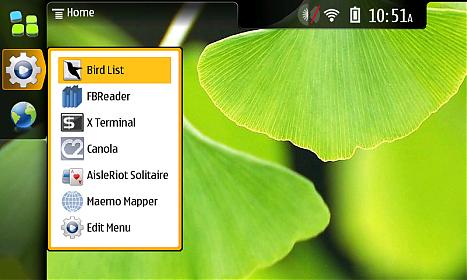
The advantage of the Maemo platform is how open it is. Root access is very easy to enable (just enable the third-party app repository and install openssh, then load up the built-in Terminal). All of the applications are either taken from open-source repositories and compiled for the platform or written in native C or Python, etc. The GUI is based on X-Windows withs support for GTK and QT. The browser is Mozilla-based and has flash built-in (hulu, anyone?).
WebOS is currently utilizing a Linux kernel based on v2.6.24, and it support the Itsy Package Management System (which is very similar to Debian's packaging system). Gaining root requires just enabling developer mode; an app providing that switch is pre-installed and easy to access. Once you telnet to the device (using novaterm), you can add an ipkg repository and install openssh.

The platform supports native applications, but the GUI is homegrown and currently only supports applications written in javascript. The browser is Webkit-based and will support flash later this year.
The following comparisons can be made between the two platforms.
+ Maemo and WebOS use Linux as their kernel base and support glib.
+ Maemo and WebOS use nearly the same packaging system.
+ Both platforms are not locked down and include the tools that allow anyone to install anything on their devices.
- Maemo uses a native development environment and supports any X-enabled GUI application that can be compiled for the platform. WebOS allows for non-GUI applications to be run without killing the homegrown graphical interface, but the graphical interface must be closed in order to run standard X apps.
- Maemo has a built-in GUI terminal app. With WebOS, you have to use a web-enabled terminal.
- Maemo supports desktop widgets. WebOS currently does not.
Despite the differences between the two platforms, the goals that the two platforms try to achieve are parallel to one another. Both Maemo and WebOS provide for easy multitasking and provide applications to support simple communication via the Internet. Nokia and Palm both handle notifications in a similar fashion, but Palm's approach feel more polished.
Even though Nokia could accomplish what Palm has given time, it would be to their advantage to inherit Palm's design approach and immediately have a competitive platform with respect to Google's Android and Apple's iPhone OS. And given that Nokia has been open-sourcing platform they have acquired (Symbian, QT), I feel that they would approach WebOS in a similar manner, which would be a good thing for the mobile computing community. And let's not forget: Nokia makes really good hardware, and they have the resources to support Palm. Given that the Palm Pre has been getting a good reception in Europe, it makes even more sense for Nokia to embrace Palm.
We'll see what transpires...all I know is that Dell buying Palm is not quite so appealing when you consider Nokia as a potential parent.
So, to begin this justification, I first need to go into a little bit of detail on the Maemo and WebOS platforms. Feel free to skip this section if you are already familiar with them.
I have experience with Maemo as a developer and a user. I primarily worked with Maemo 2008 on the Nokia N800 internet tablet. The Maemo kernel is based on Linux v2.6.21, and the filesystem supports the Debian distribution model.
The advantage of the Maemo platform is how open it is. Root access is very easy to enable (just enable the third-party app repository and install openssh, then load up the built-in Terminal). All of the applications are either taken from open-source repositories and compiled for the platform or written in native C or Python, etc. The GUI is based on X-Windows withs support for GTK and QT. The browser is Mozilla-based and has flash built-in (hulu, anyone?).
WebOS is currently utilizing a Linux kernel based on v2.6.24, and it support the Itsy Package Management System (which is very similar to Debian's packaging system). Gaining root requires just enabling developer mode; an app providing that switch is pre-installed and easy to access. Once you telnet to the device (using novaterm), you can add an ipkg repository and install openssh.
The platform supports native applications, but the GUI is homegrown and currently only supports applications written in javascript. The browser is Webkit-based and will support flash later this year.
The following comparisons can be made between the two platforms.
+ Maemo and WebOS use Linux as their kernel base and support glib.
+ Maemo and WebOS use nearly the same packaging system.
+ Both platforms are not locked down and include the tools that allow anyone to install anything on their devices.
- Maemo uses a native development environment and supports any X-enabled GUI application that can be compiled for the platform. WebOS allows for non-GUI applications to be run without killing the homegrown graphical interface, but the graphical interface must be closed in order to run standard X apps.
- Maemo has a built-in GUI terminal app. With WebOS, you have to use a web-enabled terminal.
- Maemo supports desktop widgets. WebOS currently does not.
Despite the differences between the two platforms, the goals that the two platforms try to achieve are parallel to one another. Both Maemo and WebOS provide for easy multitasking and provide applications to support simple communication via the Internet. Nokia and Palm both handle notifications in a similar fashion, but Palm's approach feel more polished.
Even though Nokia could accomplish what Palm has given time, it would be to their advantage to inherit Palm's design approach and immediately have a competitive platform with respect to Google's Android and Apple's iPhone OS. And given that Nokia has been open-sourcing platform they have acquired (Symbian, QT), I feel that they would approach WebOS in a similar manner, which would be a good thing for the mobile computing community. And let's not forget: Nokia makes really good hardware, and they have the resources to support Palm. Given that the Palm Pre has been getting a good reception in Europe, it makes even more sense for Nokia to embrace Palm.
We'll see what transpires...all I know is that Dell buying Palm is not quite so appealing when you consider Nokia as a potential parent.
Monday, October 26, 2009
Palm WebOS Should Support Facebook Open Platform and OpenSocial APIs
This seems so obvious that I held off posting about it until today, but it bothers me. Granted, I've already run out of space for apps on my Palm Pre (hopefully they either expand /var or create a container for apps on the FAT partition, or maybe I'll give in and do it myself), and i'm not a big user of Facebook apps (aside from Go, most of the apps I do have are for syncing information), but given that the current application SDK is based on Javascript and rendering HTML, it only makes sense that Palm would build in support for Facebook and OpenSocial apps. Having API support for these platforms would provide Palm and WebOS users access to numerous and a growing ecosystem of both web-enabled and native applications. Of course one can use these applications via the built-in browser, but having the ability to both install and use any of these applications would be a huge selling point for WebOS. In fact, syncing support within WebOS should provide the capability of syncing one's installed set of Facebook and OpenSocial Apps.
And while they're at it, Palm should also add bookmark syncing and integrate Facebook and LinkedIn profile links within Contacts. Facebook Chat should also be added to Messaging, and Facebook and LinkedIn messages to Email. And, of course, let's not forget about making everything work faster under WebOS...I think i'll have to leave my set of requests at that for now.
And while they're at it, Palm should also add bookmark syncing and integrate Facebook and LinkedIn profile links within Contacts. Facebook Chat should also be added to Messaging, and Facebook and LinkedIn messages to Email. And, of course, let's not forget about making everything work faster under WebOS...I think i'll have to leave my set of requests at that for now.
Saturday, October 17, 2009
The Sense Experience Running on Android
I decided to take a look at a review of the HTC Hero on Engadget to get an idea of what innovations HTC has implemented on top of Android to improve the overall experience of using the device. This review is a bit dated, but given that the Hero is now being offered on Sprint I figured it was somewhat relevant.
I have played around with the Google Dev Phone (i.e. the HTC T-Mobile G1), and I also have experience developing a basic networking / statistics gathering application for Android OS. Similar to the Pre, once you provide your Google login information you are given access to a slew of Google services and applications including Gmail, Gchat, your Google contacts, and Google Voice.
The Android OS application development environment is based on Java which drastically decreases the complexity of designing for this platform, and in addition to providing an open distribution model (applications can be distributed via a website or through the Android Market) which would explain the influx of developers despite the small (albeit growing) number of users on this platform. Overall, I felt that the web documentation, multi-platform integration with Eclipse, and the ease of testing applications on either a real device or the emulator provides for a great developer experience.
While I did enjoy tying Google Voice with Gizmo on the G1 (to provide me with a cell network-less phone) and using native applications such as Gmail and MP3Tunes, I was not incredibly impressed with the method of multitasking on the device (relying on the pull-down menu to access running tasks and notifications) and not being able to keep websites loaded while I am using other applications. The Sense UI, however, in conjunction with the standard widgets currently available on Android, does allow for having simple functions concurrently and quickly accessible via the available 7 "screens". Having the weather, messaging, music player controls, bookmarks, and photo album access always running and available quickly is advantageous, but not having the ability to leave browser pages open prevents me from truly taking advantage of the multitasking goodness of the OS. I could see myself trying to make do with a Google Reader widget, but as soon as I started selecting links and interfacing between that site and Facebook/email/messaging, I feel I may be left a bit disappointed. It sure is nice for Android to have Flash lite, but Engadget demonstrates how slow it really is (hence why Adobe's announcement of Flash 10.1 mobile for WebOS and Android is so important). Anyhow, take a look at the Engadget demo of widgets in conjunction with the Sense Experience below.
I have played around with the Google Dev Phone (i.e. the HTC T-Mobile G1), and I also have experience developing a basic networking / statistics gathering application for Android OS. Similar to the Pre, once you provide your Google login information you are given access to a slew of Google services and applications including Gmail, Gchat, your Google contacts, and Google Voice.
The Android OS application development environment is based on Java which drastically decreases the complexity of designing for this platform, and in addition to providing an open distribution model (applications can be distributed via a website or through the Android Market) which would explain the influx of developers despite the small (albeit growing) number of users on this platform. Overall, I felt that the web documentation, multi-platform integration with Eclipse, and the ease of testing applications on either a real device or the emulator provides for a great developer experience.
While I did enjoy tying Google Voice with Gizmo on the G1 (to provide me with a cell network-less phone) and using native applications such as Gmail and MP3Tunes, I was not incredibly impressed with the method of multitasking on the device (relying on the pull-down menu to access running tasks and notifications) and not being able to keep websites loaded while I am using other applications. The Sense UI, however, in conjunction with the standard widgets currently available on Android, does allow for having simple functions concurrently and quickly accessible via the available 7 "screens". Having the weather, messaging, music player controls, bookmarks, and photo album access always running and available quickly is advantageous, but not having the ability to leave browser pages open prevents me from truly taking advantage of the multitasking goodness of the OS. I could see myself trying to make do with a Google Reader widget, but as soon as I started selecting links and interfacing between that site and Facebook/email/messaging, I feel I may be left a bit disappointed. It sure is nice for Android to have Flash lite, but Engadget demonstrates how slow it really is (hence why Adobe's announcement of Flash 10.1 mobile for WebOS and Android is so important). Anyhow, take a look at the Engadget demo of widgets in conjunction with the Sense Experience below.
Saturday, September 19, 2009
Motorola CLIQ: "Everything was a blur..."
"It sounds like a night of drunkin'...you know...'I don't know what happened...I sent a text message, I got an email, I added a new contact...I woke up in a gutter'...Moto Blur!" I think Joshua Topolsky (Engadget Correspondent) got it down when he covered it during The Engadget Show - 001.
While WebOS on the Palm Pre provides a mechanism to receive notifications and integrate your online accounts onto the device, it does so in a way that is non-obtrusive and functional. Motorola's Blur, on the other-hand, brings you all of your social network notifications within one universal inbox, in which you'll have to swipe through (or select individual networks) to follow the stream. I feel that Blur would be on the verge of social network / information overload.
When I want to dive into the stream with the Pre, I use applications such as Tweed, Google Reader, and Facebook. I do receive SMS updates from Facebook, but once there is a good notification-enabled Facebook app, I will likely disable those as well. I also added more filters into my Gmail inbox to only receive emails I really want to be notified about on my communicator.
The one advantage to the Motorola way is that it may be easier to view a person's social tweets or read about a topic within my stream. Hopefully there will be an application for that ;-)
For those interested in seeing a demo of the Motorola CLIQ, see below (taken from the Engadget first hands-on impressions).
While WebOS on the Palm Pre provides a mechanism to receive notifications and integrate your online accounts onto the device, it does so in a way that is non-obtrusive and functional. Motorola's Blur, on the other-hand, brings you all of your social network notifications within one universal inbox, in which you'll have to swipe through (or select individual networks) to follow the stream. I feel that Blur would be on the verge of social network / information overload.
When I want to dive into the stream with the Pre, I use applications such as Tweed, Google Reader, and Facebook. I do receive SMS updates from Facebook, but once there is a good notification-enabled Facebook app, I will likely disable those as well. I also added more filters into my Gmail inbox to only receive emails I really want to be notified about on my communicator.
The one advantage to the Motorola way is that it may be easier to view a person's social tweets or read about a topic within my stream. Hopefully there will be an application for that ;-)
For those interested in seeing a demo of the Motorola CLIQ, see below (taken from the Engadget first hands-on impressions).
Monday, July 13, 2009
Windows 7 Touch vs. Chrome OS
Many of you may have already seen the Windows 7 Touch demo shown by a CNET commentator; for those of you who haven't, I highly recommend watching it, just to get an idea of what using Windows 7 on a touch screen would be like. I'm not traditionally impressed with Windows GUI enhancements; I used Windows 2000 until up to a year after Windows XP was released primarily because I felt it was silly and resource inefficient, but I eventually had to give in. The primary Windows Vista feature I have enjoyed is the instant search (just hit the Windows key and start typing for applications and files, etc., then hit to launch).
Windows 7, however, brings many features that make Windows are much more useful than Microsoft has introduced since Windows 95. The Apple Dock-like grouping of running windows/applications in the former quick-launch area is really nice, especially given its quick-preview capabilities (first introduced with Windows Vista). The Sidebar widgets can now be placed anywhere on the desktop, and with the desktop quick-look feature on the lower-right corner of the taskbar (just hover to see your desktop), widgets become as useful as Apple Dashboard has made them.
I'm sure Chrome OS will be bringing a unique WebOS-like interface to using a touch-based netbook. Native Client would allow Google to bring the advantage of running applications natively to Chrome OS, and Chrome OS will properly manage web pages more as processes running that can be left open while the netbook is in use. I would say Chrome OS is more appropriate for a netbook than running a traditional UI-based Windows or Linux has been.
But if you take a look at this Windows 7 touch demo, you'll see where Microsoft will excel. Many people already use Windows and are familiar with it; what is a nice touch is that Microsoft ensured that the new GUI features introduced into Windows 7 will also make touch navigation native to the OS. So without further ado, watch the below youtube clip and feel free to leave comments on any additional information you find about either OS.
Windows 7, however, brings many features that make Windows are much more useful than Microsoft has introduced since Windows 95. The Apple Dock-like grouping of running windows/applications in the former quick-launch area is really nice, especially given its quick-preview capabilities (first introduced with Windows Vista). The Sidebar widgets can now be placed anywhere on the desktop, and with the desktop quick-look feature on the lower-right corner of the taskbar (just hover to see your desktop), widgets become as useful as Apple Dashboard has made them.
I'm sure Chrome OS will be bringing a unique WebOS-like interface to using a touch-based netbook. Native Client would allow Google to bring the advantage of running applications natively to Chrome OS, and Chrome OS will properly manage web pages more as processes running that can be left open while the netbook is in use. I would say Chrome OS is more appropriate for a netbook than running a traditional UI-based Windows or Linux has been.
But if you take a look at this Windows 7 touch demo, you'll see where Microsoft will excel. Many people already use Windows and are familiar with it; what is a nice touch is that Microsoft ensured that the new GUI features introduced into Windows 7 will also make touch navigation native to the OS. So without further ado, watch the below youtube clip and feel free to leave comments on any additional information you find about either OS.
Sunday, June 21, 2009
My New Communicator: The Palm Pre
Before-Pre Mornings: I wake up, refresh the iGoogle page on my laptop, and check Entourage for work emails. I would grab breakfast and watch The Daily Show or The Colbert Report (depending on what I had last seen). I would head to work and refresh my iGoogle page when I got there, checking it throughout the day for personal emails, Google Reader alerts, and news headlines.
After-Pre Mornings: I wake up, grab the Pre and turn on the screen. I look at the notifications bar and find a chat and email alert; I respond to the chat(s), whether they be GChat, AIM, or SMS, and I look at the emails (both work and personal). I then load the Google Reader mobile page and start going through all of my Facebook alerts, Slashdot headlines, and White House RSS messages. 20 minutes later, I finally put the device down and grab breakfast. I may start watching The Daily Show or The Colbert Report; if I do I still pick up the Pre half-way through the episode and start browsing the web; if I don't, I just take a shower and walk out the door still looking at stuff on the Pre.
I think you get the idea...Palm has become the center of my life once again.
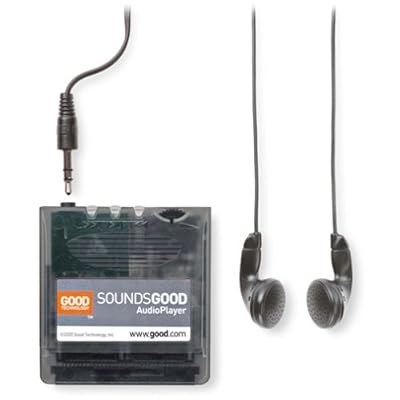 I was first introduced to Palm OS by my aunt; she bought me a Handspring Visor Deluxe when I was 16, and at the time I was obsessed about syncing my Calendar, AvantGo (for news articles), Memos, and To Do Lists. I also ended up buying a SoundsGood expansion for the Handspring so that I could listen to mp3s with it, and I also obtained the eyemodule to take pictures with.
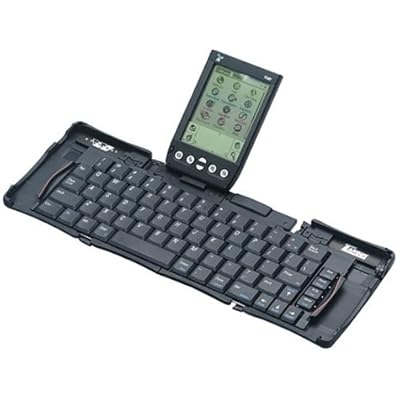 When I was 18, my aunt bought me the Targus StowAway foldable keyboard, which I used quite a bit Freshman Year of College (I had to spend time working on assignments outside of my dorm room, which insipired me to use it).
 Then my family surprised me with a cell phone for Christmas Freshman year; I remember how pissed I was. I guess I was trying to avoid getting a cell phone for as long as possible; not all of my friends had cell phones yet, and I felt like I could get away with not having one (I stayed logged into AIM 24/7 at the time, and responded to emails). I think it was mostly the fact that my parents had signed a 2-year contract for me, and it was with a really crappy Kyocera phone (Phatom KX414).
By the time the two years were almost up (Junior Year of College), the phone would barely work for 5 minutes without dying, so I had to get a new one. Rather than sign another contract for a new phone, I looked on ebay for a used smartphone and found the Kyocera 7135 (a Palm-OS based phone). I ended up paying ~$65 for it, which I thought was a great deal at the time for a smartphone.
The advantage of having a Kyocera 7135 is that I was able to easily migrate from the Handspring, including all calendar events, contacts, memos, and applications; it was also nice to finally have a color screen. The disadvantage was that the phone application was unstable at times and I did not get good talk time with it. It was nice being able to use a stylus to type text messages, but sometimes I would not receive messages and the phone would struggle to send them. I also started to get sick of having to constantly sync my phone to preserve my data and update web applications. I had to use a backup program that I setup to backup everything nightly to an SD card; I had to restore my phone everytime the battery completely drained or the phone crashed and I had to do a hard-reset.
Some of my most used applications on Palm OS include:
AvantGo - News articles updated at each sync; I also created a custom page load for the bus routes, which was very handy.
Tetris - This game came with my phone, and it worked great in all its color glory. I would still love to put this on the Pre at some point, but I'm willing to wait for an official app. (I tried loading it into Classic, but the game showed up black-and-white and was awkward to play.)
MineHunt - This is a classic Palm OS game, but it is still really fun to play; I also hope this ends up on WebOS at some point.
HardBall - Again, another fun classic Palm OS game.
Advanced Calc - This was a Handspring-exclusive Palm OS app that I really miss. I haven't been able to migrate it to my Kyocera 7135 or the Classic app successfully; if anyone knows how to migrate locked Handspring Palm OS apps, please let me know.
CityTime - Another locked Handspring Palm OS app that I loved. I just want to be able to have time of more than one locale...why is it so hard to find apps that do this. BTW, I currently use VelaClock on the Mac OS Dashboard...hope they develop a WebOS app!
RoscoView - This was a nice picture viewer for Palm OS.
CardBkup - The backup program I was talking about earlier.
Bebopper - A nice basic mp3 player that worked well on the 7135.
DocumentsToGo - Nice for browsing .doc files, etc.
I still can't believe I continued to use the 7135 for as long as I did; one of my friends even found a spare that I switched to when my battery was bad and the device was acting up. I really wanted to retire it, but I wasn't pleased with the lack of updates to Palm OS, and I wasn't too interested in getting a PocketPC-based smartphone (although I did consider it at one point). Blackberry was tempting for a little bit (just so that I could access email quickly), but ultimately I was looking for something that could truly become my new personal assistant and all-in-one mobile device.
Then came the iPhone...I think if I hadn't gone to the Philippines, I might have picked up the original iPhone and switched to AT&T. At least the original iPhone included 250 SMS Text Messages a month and was $59.99 for the 450 minute plan (in retrospect, I would have been very happy with this plan). Then the iPhone 3G came out...and AT&T raised the price to $69.99, or $74.99 with 250 SMS Text Messages...and I was very unhappy. At that point I had returned from the Philippines and, again, craving a new phone, I would have considered buying an iPhone if Apple had come out with the 32GB version in Summer 2008 and AT&T hadn't raised the service fees.
If Palm hadn't come along to introduce the revolutionary WebOS and the Palm Pre January 2009, and if they had postponed the release past June 6, I might have bought an iPhone 3GS 32GB instead. I've been waiting for a long time for a new phone, and I would have loved the extra space and processor upgrade. But Apple remained hard-set on locking down the iPhone and preventing it from multitasking with 3rd party apps.
So when Palm introduced the Pre and told us it would be on Sprint, I was very excited...finally, competition that would bring the service fees down and provide an alternative way of using a mobile device. And alas, I am very happy with the $69.99 Everything Data Sprint plan, and I love using the Pre. So here we go, time to talk about the Palm Pre (finally...).
The weekend the Pre was released, my friends had scheduled a camping trip to Devil's Lake and they wouldn't let me get away with sitting in Madison all weekend just so that I can pick up the Palm Pre. Fortunately my friend Jesse needed to drive back to Madison early Saturday morning for a family event, so I convinced him to leave around 6:30AM. I had been planning to pick up the phone at Best Buy, but I was worried about the limited supply (~5 at each store in Madison), so I would have gone to the store at 5AM, but Sprint sent an email letting everyone waiting know that the Sprint stores would be open at 8AM. So I ended up standing outside of the Sprint store 10 minutes to 8; I was 15 in line. At that point, I was tired, smelled of campfire, and thinking that I probably wouldn't be able to get one, given I wasn't in the first 5. But they let us all in and gave each of us a printed sales sheet with a number; by the end of the 1.5 hours I was there, they had over 100 people, and they still had enough phones for everyone!
I had U.S. Cellular up to that point (I love U.S. Cellular; they provide great cell service in Wisconsin and I haven't been disappointed, even when visiting IL, MN, or MI; customer service is also #1; if they had been able to offer the Pre with a good comprehensive service plan, I would have stuck with them; good luck to them on ending U.S. exclusive handset deals, which really only benefit the large cell service providers.) The switch took a couple of hours, so I had to take the Palm Pre home and was unable to turn it on until the migration completed. Fortunately Sprint had a way to check the status online (it turned out the rep was missing a key piece of information that I provided when I called customer service after going home).
When I first turned on the Pre, it asked me to register for a Palm Profile and then asked me to log in to my online accounts. First was Google; all I did was type in my login info once on the phone, and with a couple exceptions the phone downloaded all of my contacts, calendar events*, email, and logged me into Gmail chat. Next was Facebook, and then Synergy began to do its thing, linking my Google contacts to Facebook. I found that it did a relatively good job; it even pulled in my contacts' photos from Gmail and Facebook and put them as the contacts' photos :-) And it is very easy to link more contacts together or remove incorrect links, and correcting Google contacts results in the changes being pushed back to Google (and vice-versa). I was so impressed with this...this is exactly what I wanted my new communicator to do...no need for syncing with my computer! In fact, the first time I actually plugged in the usb cable to access data was to mount the device in USB target disk mode, where I can drag files back and forth, and that's how I added some audiobooks, mp3s, images, and Classic apps. I have not used media sync yet (I'm not terribly interested in using iTunes as my media manager, although if I can have sync'ing happen over wifi, I would consider it).
WebOS also had no problem connecting to Exchange using the web-access http method; it downloaded my mail, calendar, and provided access to the Global Address Book within contacts. The only issue is that sometimes you need to look at the Accounts section for alternate apps and make sure you don't need to enter your password a second time; once you do this, everything starts syncing as excpeted.
*With regards to Calendar, I had a Google sync'd version of my work calendar in addition to the Exchange-based calendar. Both of these calendars for conflicting with one-another, which caused the day view from not being displayed properly. However, I continued to receive event notifications, and the day were gray-shaded within the month view. Anyhow, by disabling and re-enabling calendars, I was able to get the Calendars to show up.*
The browser is very fast and I've been relatively happy with it. With regards to mp3 links, I am able to stream podcasts over 3G, and most of the time I am able to listen to the entire thing without refreshing the page. This does tend to be a memory-intensive task; once the podcast has fully buffered, I tend to run out of memory and am unable to open anything other than the podcast. I have also noticed that WebOS acts similar to a web browser with tabs; if you open tabs that consume a lot of memory, some browsers (and older versions of Firefox) have difficulty recovering memory after you close done a tab. The only resolution to this on a desktop is to completely shutdown the browser and restart it. With WebOS, I find myself having to close down ALL open cards and wait up to a minute before I can open new cards again; on rare occasions I also have to reboot the Pre to have it free all memory. Having some better garbage collection and memory management within WebOS should drastically improve performance and useability, and I expect this will improve in the future (that's the negative of designing a truly multitasking environment, but it's a good negative to have ;-) ).
One more thing about the browser...it has great pinch and double-tap support (almost exactly the same as the iPhone's), but the pivot is the best feature (just hold down your finger on the area of the page you'd like to zoom to, and use the pinch gestures to zoom in or out within that area.
Some requests for the browser: I'd like to suggest that the orange button on the keyboard, which currently functions to move the cursor in text boxes, also provides an option key or right-click function, in which I would be able to click on a link or a picture and Save As (to support downloading files to the communicator). It would make me very happy to be able to download an mp3 or save a jpeg without having to plug the Pre into my computer or send it via email. I would also like to be able to copy and paste into fields within the browser, and to select text to copy/paste that isn't in an email, etc.
I am extremely happy with the Messaging app and the notifications area. I find myself chatting with my friends a lot more often now than I have during the last few years. I just haven't had the desire to login to a chat program and leave it running; the phone is the perfect place for an always-on chat program to run. I love how Gmail, AIM, and SMS are tightly integrated within this app, and I find great enjoyment walking and chatting with people (I think it will become my new pass-time; it will get me to enjoy the outdoors more often).
I enabled the advanced gestures, and after having gotten used to them, I enjoy doing right-to-left and left-to-right gestures to alt-tab between open cards.
As soon as I realized that I could use Pandora Radio in the car, I went to Best Buy and started testing Bluetooth stereos. I found the Pioneer DEH-D7000BT to be the easiest to configure and pair with my phone, so I went with that, and I have not been disappointed! As long as I leave the Bluetooth radio on with my phone, I can walk into the car, turn on the stereo, and it automatically links up to my phone within 1 minute. At that point, I am able take calls hands-free and listen to internet radio and use turn-by-turn over the stereo! In fact, these apps were designed so well that when I receive a call, Pandora automatically pauses, and when the call ends, Pandora resumes! With turn-by-turn by Sprint, the music fades out while the directions are read, and the music fades back when the turn-by-turn is done talking! It's so awesome...I was even able to drive between Madison and Milwaukee on 94E and then 43N and finally highway 60 without any skips (Pandora may take a few seconds to buffer if I skipped a song though).
In terms of 3G and Wifi performance, using the iPhone speedtest, I was getting ~1500 Kbps on 3G (full strength) and ~2500 Kbps on Wifi, which is better than the iPhone.
SprintTV is great (high-quality and loads quickly), and Youtube works great (the browser automatically passes any youtube link to the app so that it loads properly on the Pre). I also enjoyed being able to update WebOS without needing a PC (over the air)!
This has gotten really long, so I'm going to try to wrap up. The Music app needs to at least be able to resume mp3 playback (it is difficult to listen to audiobooks without this capability); it also needs to allow me to create custom playlists on the fly. I also would love to have more than 8GB (so easy to fill with audiobooks, images, etc.). But aside from the above complaints, I've been extremely happy with the Pre, and would recommend it to anyone who is looking for a good alternative to the iPhone. In fact, if one is looking more for a communicator and less for a mobile computer, the Palm Pre fits perfectly for this role. I feel that the iPhone is great for multimedia, apps, and gaming, but the fact that you can't stay logged into AIM (without using Apple's push notifications or GChat while you are browsing the web and listening to Pandora Radio is a huge gap in how I expect to use a mobile device. Please feel free to leave comments or send messages to @techramble on Twitter.
Links (Updated 3/24/09):
Anandtech Palm Pre Review
Ars Technica Palm Pre Review (Part 1)
Ars Technica Palm Pre Review (Part 2: WebOS)
Engadget Podcast Palm Pre Review Discussion
Palm Pre on MP3Tunes Forums
P.S. Pandora is nice to have, but Last.fm is what I really want on the Palm Pre! Please follow through with this soon, Last.fm!
After-Pre Mornings: I wake up, grab the Pre and turn on the screen. I look at the notifications bar and find a chat and email alert; I respond to the chat(s), whether they be GChat, AIM, or SMS, and I look at the emails (both work and personal). I then load the Google Reader mobile page and start going through all of my Facebook alerts, Slashdot headlines, and White House RSS messages. 20 minutes later, I finally put the device down and grab breakfast. I may start watching The Daily Show or The Colbert Report; if I do I still pick up the Pre half-way through the episode and start browsing the web; if I don't, I just take a shower and walk out the door still looking at stuff on the Pre.
I think you get the idea...Palm has become the center of my life once again.
I was first introduced to Palm OS by my aunt; she bought me a Handspring Visor Deluxe when I was 16, and at the time I was obsessed about syncing my Calendar, AvantGo (for news articles), Memos, and To Do Lists. I also ended up buying a SoundsGood expansion for the Handspring so that I could listen to mp3s with it, and I also obtained the eyemodule to take pictures with.When I was 18, my aunt bought me the Targus StowAway foldable keyboard, which I used quite a bit Freshman Year of College (I had to spend time working on assignments outside of my dorm room, which insipired me to use it).Then my family surprised me with a cell phone for Christmas Freshman year; I remember how pissed I was. I guess I was trying to avoid getting a cell phone for as long as possible; not all of my friends had cell phones yet, and I felt like I could get away with not having one (I stayed logged into AIM 24/7 at the time, and responded to emails). I think it was mostly the fact that my parents had signed a 2-year contract for me, and it was with a really crappy Kyocera phone (Phatom KX414).By the time the two years were almost up (Junior Year of College), the phone would barely work for 5 minutes without dying, so I had to get a new one. Rather than sign another contract for a new phone, I looked on ebay for a used smartphone and found the Kyocera 7135 (a Palm-OS based phone). I ended up paying ~$65 for it, which I thought was a great deal at the time for a smartphone.
The advantage of having a Kyocera 7135 is that I was able to easily migrate from the Handspring, including all calendar events, contacts, memos, and applications; it was also nice to finally have a color screen. The disadvantage was that the phone application was unstable at times and I did not get good talk time with it. It was nice being able to use a stylus to type text messages, but sometimes I would not receive messages and the phone would struggle to send them. I also started to get sick of having to constantly sync my phone to preserve my data and update web applications. I had to use a backup program that I setup to backup everything nightly to an SD card; I had to restore my phone everytime the battery completely drained or the phone crashed and I had to do a hard-reset.
Some of my most used applications on Palm OS include:
AvantGo - News articles updated at each sync; I also created a custom page load for the bus routes, which was very handy.
Tetris - This game came with my phone, and it worked great in all its color glory. I would still love to put this on the Pre at some point, but I'm willing to wait for an official app. (I tried loading it into Classic, but the game showed up black-and-white and was awkward to play.)
MineHunt - This is a classic Palm OS game, but it is still really fun to play; I also hope this ends up on WebOS at some point.
HardBall - Again, another fun classic Palm OS game.
Advanced Calc - This was a Handspring-exclusive Palm OS app that I really miss. I haven't been able to migrate it to my Kyocera 7135 or the Classic app successfully; if anyone knows how to migrate locked Handspring Palm OS apps, please let me know.
CityTime - Another locked Handspring Palm OS app that I loved. I just want to be able to have time of more than one locale...why is it so hard to find apps that do this. BTW, I currently use VelaClock on the Mac OS Dashboard...hope they develop a WebOS app!
RoscoView - This was a nice picture viewer for Palm OS.
CardBkup - The backup program I was talking about earlier.
Bebopper - A nice basic mp3 player that worked well on the 7135.
DocumentsToGo - Nice for browsing .doc files, etc.
I still can't believe I continued to use the 7135 for as long as I did; one of my friends even found a spare that I switched to when my battery was bad and the device was acting up. I really wanted to retire it, but I wasn't pleased with the lack of updates to Palm OS, and I wasn't too interested in getting a PocketPC-based smartphone (although I did consider it at one point). Blackberry was tempting for a little bit (just so that I could access email quickly), but ultimately I was looking for something that could truly become my new personal assistant and all-in-one mobile device.
Then came the iPhone...I think if I hadn't gone to the Philippines, I might have picked up the original iPhone and switched to AT&T. At least the original iPhone included 250 SMS Text Messages a month and was $59.99 for the 450 minute plan (in retrospect, I would have been very happy with this plan). Then the iPhone 3G came out...and AT&T raised the price to $69.99, or $74.99 with 250 SMS Text Messages...and I was very unhappy. At that point I had returned from the Philippines and, again, craving a new phone, I would have considered buying an iPhone if Apple had come out with the 32GB version in Summer 2008 and AT&T hadn't raised the service fees.
If Palm hadn't come along to introduce the revolutionary WebOS and the Palm Pre January 2009, and if they had postponed the release past June 6, I might have bought an iPhone 3GS 32GB instead. I've been waiting for a long time for a new phone, and I would have loved the extra space and processor upgrade. But Apple remained hard-set on locking down the iPhone and preventing it from multitasking with 3rd party apps.
So when Palm introduced the Pre and told us it would be on Sprint, I was very excited...finally, competition that would bring the service fees down and provide an alternative way of using a mobile device. And alas, I am very happy with the $69.99 Everything Data Sprint plan, and I love using the Pre. So here we go, time to talk about the Palm Pre (finally...).
The weekend the Pre was released, my friends had scheduled a camping trip to Devil's Lake and they wouldn't let me get away with sitting in Madison all weekend just so that I can pick up the Palm Pre. Fortunately my friend Jesse needed to drive back to Madison early Saturday morning for a family event, so I convinced him to leave around 6:30AM. I had been planning to pick up the phone at Best Buy, but I was worried about the limited supply (~5 at each store in Madison), so I would have gone to the store at 5AM, but Sprint sent an email letting everyone waiting know that the Sprint stores would be open at 8AM. So I ended up standing outside of the Sprint store 10 minutes to 8; I was 15 in line. At that point, I was tired, smelled of campfire, and thinking that I probably wouldn't be able to get one, given I wasn't in the first 5. But they let us all in and gave each of us a printed sales sheet with a number; by the end of the 1.5 hours I was there, they had over 100 people, and they still had enough phones for everyone!
I had U.S. Cellular up to that point (I love U.S. Cellular; they provide great cell service in Wisconsin and I haven't been disappointed, even when visiting IL, MN, or MI; customer service is also #1; if they had been able to offer the Pre with a good comprehensive service plan, I would have stuck with them; good luck to them on ending U.S. exclusive handset deals, which really only benefit the large cell service providers.) The switch took a couple of hours, so I had to take the Palm Pre home and was unable to turn it on until the migration completed. Fortunately Sprint had a way to check the status online (it turned out the rep was missing a key piece of information that I provided when I called customer service after going home).
When I first turned on the Pre, it asked me to register for a Palm Profile and then asked me to log in to my online accounts. First was Google; all I did was type in my login info once on the phone, and with a couple exceptions the phone downloaded all of my contacts, calendar events*, email, and logged me into Gmail chat. Next was Facebook, and then Synergy began to do its thing, linking my Google contacts to Facebook. I found that it did a relatively good job; it even pulled in my contacts' photos from Gmail and Facebook and put them as the contacts' photos :-) And it is very easy to link more contacts together or remove incorrect links, and correcting Google contacts results in the changes being pushed back to Google (and vice-versa). I was so impressed with this...this is exactly what I wanted my new communicator to do...no need for syncing with my computer! In fact, the first time I actually plugged in the usb cable to access data was to mount the device in USB target disk mode, where I can drag files back and forth, and that's how I added some audiobooks, mp3s, images, and Classic apps. I have not used media sync yet (I'm not terribly interested in using iTunes as my media manager, although if I can have sync'ing happen over wifi, I would consider it).
WebOS also had no problem connecting to Exchange using the web-access http method; it downloaded my mail, calendar, and provided access to the Global Address Book within contacts. The only issue is that sometimes you need to look at the Accounts section for alternate apps and make sure you don't need to enter your password a second time; once you do this, everything starts syncing as excpeted.
*With regards to Calendar, I had a Google sync'd version of my work calendar in addition to the Exchange-based calendar. Both of these calendars for conflicting with one-another, which caused the day view from not being displayed properly. However, I continued to receive event notifications, and the day were gray-shaded within the month view. Anyhow, by disabling and re-enabling calendars, I was able to get the Calendars to show up.*
The browser is very fast and I've been relatively happy with it. With regards to mp3 links, I am able to stream podcasts over 3G, and most of the time I am able to listen to the entire thing without refreshing the page. This does tend to be a memory-intensive task; once the podcast has fully buffered, I tend to run out of memory and am unable to open anything other than the podcast. I have also noticed that WebOS acts similar to a web browser with tabs; if you open tabs that consume a lot of memory, some browsers (and older versions of Firefox) have difficulty recovering memory after you close done a tab. The only resolution to this on a desktop is to completely shutdown the browser and restart it. With WebOS, I find myself having to close down ALL open cards and wait up to a minute before I can open new cards again; on rare occasions I also have to reboot the Pre to have it free all memory. Having some better garbage collection and memory management within WebOS should drastically improve performance and useability, and I expect this will improve in the future (that's the negative of designing a truly multitasking environment, but it's a good negative to have ;-) ).
One more thing about the browser...it has great pinch and double-tap support (almost exactly the same as the iPhone's), but the pivot is the best feature (just hold down your finger on the area of the page you'd like to zoom to, and use the pinch gestures to zoom in or out within that area.
Some requests for the browser: I'd like to suggest that the orange button on the keyboard, which currently functions to move the cursor in text boxes, also provides an option key or right-click function, in which I would be able to click on a link or a picture and Save As (to support downloading files to the communicator). It would make me very happy to be able to download an mp3 or save a jpeg without having to plug the Pre into my computer or send it via email. I would also like to be able to copy and paste into fields within the browser, and to select text to copy/paste that isn't in an email, etc.
I am extremely happy with the Messaging app and the notifications area. I find myself chatting with my friends a lot more often now than I have during the last few years. I just haven't had the desire to login to a chat program and leave it running; the phone is the perfect place for an always-on chat program to run. I love how Gmail, AIM, and SMS are tightly integrated within this app, and I find great enjoyment walking and chatting with people (I think it will become my new pass-time; it will get me to enjoy the outdoors more often).
I enabled the advanced gestures, and after having gotten used to them, I enjoy doing right-to-left and left-to-right gestures to alt-tab between open cards.
As soon as I realized that I could use Pandora Radio in the car, I went to Best Buy and started testing Bluetooth stereos. I found the Pioneer DEH-D7000BT to be the easiest to configure and pair with my phone, so I went with that, and I have not been disappointed! As long as I leave the Bluetooth radio on with my phone, I can walk into the car, turn on the stereo, and it automatically links up to my phone within 1 minute. At that point, I am able take calls hands-free and listen to internet radio and use turn-by-turn over the stereo! In fact, these apps were designed so well that when I receive a call, Pandora automatically pauses, and when the call ends, Pandora resumes! With turn-by-turn by Sprint, the music fades out while the directions are read, and the music fades back when the turn-by-turn is done talking! It's so awesome...I was even able to drive between Madison and Milwaukee on 94E and then 43N and finally highway 60 without any skips (Pandora may take a few seconds to buffer if I skipped a song though).
In terms of 3G and Wifi performance, using the iPhone speedtest, I was getting ~1500 Kbps on 3G (full strength) and ~2500 Kbps on Wifi, which is better than the iPhone.
SprintTV is great (high-quality and loads quickly), and Youtube works great (the browser automatically passes any youtube link to the app so that it loads properly on the Pre). I also enjoyed being able to update WebOS without needing a PC (over the air)!
This has gotten really long, so I'm going to try to wrap up. The Music app needs to at least be able to resume mp3 playback (it is difficult to listen to audiobooks without this capability); it also needs to allow me to create custom playlists on the fly. I also would love to have more than 8GB (so easy to fill with audiobooks, images, etc.). But aside from the above complaints, I've been extremely happy with the Pre, and would recommend it to anyone who is looking for a good alternative to the iPhone. In fact, if one is looking more for a communicator and less for a mobile computer, the Palm Pre fits perfectly for this role. I feel that the iPhone is great for multimedia, apps, and gaming, but the fact that you can't stay logged into AIM (without using Apple's push notifications or GChat while you are browsing the web and listening to Pandora Radio is a huge gap in how I expect to use a mobile device. Please feel free to leave comments or send messages to @techramble on Twitter.
Links (Updated 3/24/09):
Anandtech Palm Pre Review
Ars Technica Palm Pre Review (Part 1)
Ars Technica Palm Pre Review (Part 2: WebOS)
Engadget Podcast Palm Pre Review Discussion
Palm Pre on MP3Tunes Forums
P.S. Pandora is nice to have, but Last.fm is what I really want on the Palm Pre! Please follow through with this soon, Last.fm!
Wednesday, April 01, 2009
Onlive: Gaming in the Cloud
Onlive is the next step in "The New Age of Desktop Computing". Onlive is an example of providing online access to a series of applications requiring fast, local compute resources. As more streaming HD-like video services become available online, it is natural to expect that an all-you-can-play gaming service would prop-up. Gamers with desires to play the latest games either have to invest in a powerful console (such as an XBOX360 or a PS3) and live with the hardware's limitations until a next-generation console is released, or upgrade your PC regularly. To run the latest games at the highest settings on a PC, one would be investing in new graphics cards, which may be purchased as early as every few months to as late as every couple of years, and the processor and memory limitations would require one to build a new computer every couple of years. For example, Crisis is a game that modern gaming PCs continue to struggle with at high resolutions.
I think that it's quite possible for something like Onlive to work; with a high throughput connection, one can stream at up to 1080p (albeit with more compression and possibly less quality than locally) without having to upgrade one's PC everytime the next generation of games are released. Control signals (such as mouse and keyboard input) do not requirement much in terms of bandwidth, but they are very demanding in terms of latency. There's a reason why gaming mice exist: to increase the resolution and physical-to-digital capabilities of one's input to the PC, and all that information needs to be transmitted very quickly to the remote servers to provide that ideal fast, remote compute system experience. Given possible deals to provide gaming as a service through transmission line companies (i.e. cable, phone, etc.) or local data centers (i.e Google), the company would be in the position to install systems at locations that can provide low latency to the gamers and provide a good experience.
As the gaming industry begins to surpass the movie industry, one can envision people willing to pay a monthly subscription fee similar to cable to be able to play unlimited games anytime, without having to use a powerful console or PC. Most likely, Onlive's largest issue will be its capacity to scale; games are power-hungry and will require huge compute farms based on the number of users in that local area, and these compute farms need to be duplicated in local environments to provide low latency to users. This will likely be more expensive to run than Youtube, given that Youtube only has to transcode the content once and serve there-in. This will be an interesting company to follow...don't be surprised if a large transmission line or Internet company ends up buying them in the near future.
See also: Engadget
I think that it's quite possible for something like Onlive to work; with a high throughput connection, one can stream at up to 1080p (albeit with more compression and possibly less quality than locally) without having to upgrade one's PC everytime the next generation of games are released. Control signals (such as mouse and keyboard input) do not requirement much in terms of bandwidth, but they are very demanding in terms of latency. There's a reason why gaming mice exist: to increase the resolution and physical-to-digital capabilities of one's input to the PC, and all that information needs to be transmitted very quickly to the remote servers to provide that ideal fast, remote compute system experience. Given possible deals to provide gaming as a service through transmission line companies (i.e. cable, phone, etc.) or local data centers (i.e Google), the company would be in the position to install systems at locations that can provide low latency to the gamers and provide a good experience.
As the gaming industry begins to surpass the movie industry, one can envision people willing to pay a monthly subscription fee similar to cable to be able to play unlimited games anytime, without having to use a powerful console or PC. Most likely, Onlive's largest issue will be its capacity to scale; games are power-hungry and will require huge compute farms based on the number of users in that local area, and these compute farms need to be duplicated in local environments to provide low latency to users. This will likely be more expensive to run than Youtube, given that Youtube only has to transcode the content once and serve there-in. This will be an interesting company to follow...don't be surprised if a large transmission line or Internet company ends up buying them in the near future.
See also: Engadget
Wednesday, March 25, 2009
The Open Company - Running your business as if it were an open-source project
This is an interesting article about a topic I've had in the back of my mind for a while. Here's the slashdot article it originated from. I may add to this further at some point, but I just wanted to present it for others to think about and discuss. Enjoy!
Sunday, March 15, 2009
Apple TV: More than just Movies and Music
I only have two gaming consoles right now, the Sony Playstation 2 and the Nintendo Wii. I purchased the PS2 freshman year of college once I had a chance to experience the console and the many RPGs available for it. There are still quite a few games (God of War 2, Onimusha, Xenosaga II) on the PS2 that I look forward to playing through one day; I feel that the PS2 is long from losing its useful life for me. I also enjoy the fact that the PS2 can all play PS1 games; I have taken advantage of this feature many times in the past.
The Nintendo Wii won me over as soon as I realized the social potential of the console. The first task to complete with a new user on the Wii is to create a new Mii for everyone who wants to play, which alone sells the console's ability to bring people together and introduces a new style of wireless gaming. It is also a perfect console for someone who does not own any Nintendo consoles; the Wii provides full Gamecube game and controller compatibility along with Virtual Console releases of most [Super] Nintendo [64] and some Sega and Turbo Grafx games.
My appeal for the Playstation 3 is quite limited right now, especially given that they have removed backward-compatibility for PS2 games. I am currently at the stance that I will only purchase an Xbox360 or PS3 if the consoles are redesigned to be smaller and to run cooler. In fact, the Xbox360 is more appealing at the moment since I have wanted to play certain Xbox games for a while (Oddworld, DOA3), the 360 provides backward-compatibility for their previous system, and the CPU and GPU are both 65nm now and power consumption drops to nearly half of the original 360.
Finally, I gave in and purchased a Nintendo DS to use during my travels between the Philippines and the U.S. last year, and that was also well-worth the purchase. I still enjoy bringing it out and playing some Mario Kart or Brain Age on the bus on my way to class, and I absolutely love the dual-screen stylus and key combos (pick up the system and try playing Zelda Phantom Hourglass or Elite Beat Agents and you'll understand). I wish more games were available that use the Nintendo DS in tandem (as a controller) with Wii games.
The one aspect missing from the Nintendo DS (and that the Sony PSP currently has) is the ability to download and store games on the device without any add-ons (like the R4, which is awesome). The iPhone is Apple's first dive into downloadable programs for an iPod-like portable device, and naturally (due to Apple's desire to create a portable device that is fast and fluid with its innovative UI) the iPhone has become a gaming device on the realms of competing with the Nintendo DS and the Sony PSP. Let's compare the specs of these three portable systems:
Nintendo DS - ARM946E-S (67 MHz, handles 3D) and ARM7TDMI (33 MHz, handles 2D)
Sony PSP - 2 MIPS32 R4000-based CPUs (333 MHz) and GPU (166 MHz)
Apple iPhone - Samsung S5L8900 (ARM, 412 MHz) and PowerVR MBX GPU
Based on the specs, the Sony PSP is by far the most powerful portable gaming system, but the Apple iPhone is not too far behind. If Apple were to allow the Samsung CPU to operate at the full 620 MHz, it might be able to compete reasonably well with the Sony PSP. And given that people like me prefer to only carry around one portable device, an all-in-one phone/pda/ipod/gaming device is very appealing. So I think the Apple has a lot of potential to compete with Sony and Nintendo in the portable realm.
But what about the console space? Can Apple compete there? Well, contrary to previous gaming system introductions (Microsoft with Xbox, Sony with Playstation), Apple has introduced gaming to their portable device first, but that doesn't stop them from bringing the experience to the Apple TV. Alas, the iPhone and Apple TV GUIs share similarities in that both devices run the same core OS (atop of differing processor architectures), and both are designed to present the user with a more limited albeit extremely useable experience given the specific purposes they serve. So, as with Mac OS X 10.49 and above when Apple had to deal with different architectures in their PCs and laptops, Apple now faces a similar predicament in the Apple TV and iPhone OS realms. Fortunately, their solution on Mac OS X was Universal Binaries, which I think was brilliant, and is a solution flexible enough to be implemented on their counterparts. Just as Universal Binaries provide PowerPC and x86 32-bit and 64-bit binaries and libraries on PCs, they could also provide ARM and x86 binaries and libraries for the iPhone and Apple TV, respectively). And on these more limited devices, the user doesn't even need to know how the software packages are distributed.
So we are not very far off from seeing an Apple TV with support for iPhone applications, including games. And hence the CNET article documenting a patent for a type of Wiimote-like remote for the Apple TV makes perfect sense (although I don't understand why they can't just employ an iPod Touch Nano for this purpose :-D ).
The Nintendo Wii won me over as soon as I realized the social potential of the console. The first task to complete with a new user on the Wii is to create a new Mii for everyone who wants to play, which alone sells the console's ability to bring people together and introduces a new style of wireless gaming. It is also a perfect console for someone who does not own any Nintendo consoles; the Wii provides full Gamecube game and controller compatibility along with Virtual Console releases of most [Super] Nintendo [64] and some Sega and Turbo Grafx games.
My appeal for the Playstation 3 is quite limited right now, especially given that they have removed backward-compatibility for PS2 games. I am currently at the stance that I will only purchase an Xbox360 or PS3 if the consoles are redesigned to be smaller and to run cooler. In fact, the Xbox360 is more appealing at the moment since I have wanted to play certain Xbox games for a while (Oddworld, DOA3), the 360 provides backward-compatibility for their previous system, and the CPU and GPU are both 65nm now and power consumption drops to nearly half of the original 360.
Finally, I gave in and purchased a Nintendo DS to use during my travels between the Philippines and the U.S. last year, and that was also well-worth the purchase. I still enjoy bringing it out and playing some Mario Kart or Brain Age on the bus on my way to class, and I absolutely love the dual-screen stylus and key combos (pick up the system and try playing Zelda Phantom Hourglass or Elite Beat Agents and you'll understand). I wish more games were available that use the Nintendo DS in tandem (as a controller) with Wii games.
The one aspect missing from the Nintendo DS (and that the Sony PSP currently has) is the ability to download and store games on the device without any add-ons (like the R4, which is awesome). The iPhone is Apple's first dive into downloadable programs for an iPod-like portable device, and naturally (due to Apple's desire to create a portable device that is fast and fluid with its innovative UI) the iPhone has become a gaming device on the realms of competing with the Nintendo DS and the Sony PSP. Let's compare the specs of these three portable systems:
Nintendo DS - ARM946E-S (67 MHz, handles 3D) and ARM7TDMI (33 MHz, handles 2D)
Sony PSP - 2 MIPS32 R4000-based CPUs (333 MHz) and GPU (166 MHz)
Apple iPhone - Samsung S5L8900 (ARM, 412 MHz) and PowerVR MBX GPU
Based on the specs, the Sony PSP is by far the most powerful portable gaming system, but the Apple iPhone is not too far behind. If Apple were to allow the Samsung CPU to operate at the full 620 MHz, it might be able to compete reasonably well with the Sony PSP. And given that people like me prefer to only carry around one portable device, an all-in-one phone/pda/ipod/gaming device is very appealing. So I think the Apple has a lot of potential to compete with Sony and Nintendo in the portable realm.
But what about the console space? Can Apple compete there? Well, contrary to previous gaming system introductions (Microsoft with Xbox, Sony with Playstation), Apple has introduced gaming to their portable device first, but that doesn't stop them from bringing the experience to the Apple TV. Alas, the iPhone and Apple TV GUIs share similarities in that both devices run the same core OS (atop of differing processor architectures), and both are designed to present the user with a more limited albeit extremely useable experience given the specific purposes they serve. So, as with Mac OS X 10.49 and above when Apple had to deal with different architectures in their PCs and laptops, Apple now faces a similar predicament in the Apple TV and iPhone OS realms. Fortunately, their solution on Mac OS X was Universal Binaries, which I think was brilliant, and is a solution flexible enough to be implemented on their counterparts. Just as Universal Binaries provide PowerPC and x86 32-bit and 64-bit binaries and libraries on PCs, they could also provide ARM and x86 binaries and libraries for the iPhone and Apple TV, respectively). And on these more limited devices, the user doesn't even need to know how the software packages are distributed.
So we are not very far off from seeing an Apple TV with support for iPhone applications, including games. And hence the CNET article documenting a patent for a type of Wiimote-like remote for the Apple TV makes perfect sense (although I don't understand why they can't just employ an iPod Touch Nano for this purpose :-D ).
Subscribe to:
Posts (Atom)